Loading
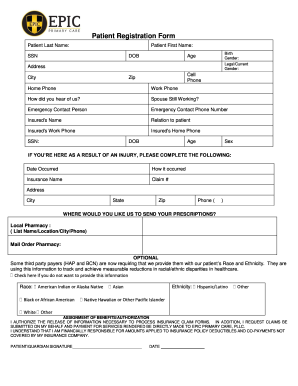
Get Patient Registration Form - Epic Primary Care
How it works
-

Open form follow the instructions
-

Easily sign the form with your finger
-

Send filled & signed form or save
How to fill out the Patient Registration Form - EPIC Primary Care online
Filling out the Patient Registration Form - EPIC Primary Care is a crucial step in establishing your care with the clinic. This guide will provide you with clear, step-by-step instructions on how to effectively complete the form online, ensuring you provide all necessary information accurately.
Follow the steps to complete the Patient Registration Form online.
- Click ‘Get Form’ button to obtain the form and open it for completion.
- Begin by entering your personal details, including your last name, first name, Social Security Number (SSN), date of birth (DOB), and address, including city, state, and zip code. Make sure that all information is accurate and current.
- Provide contact information, including cell phone, home phone, and work phone numbers. Indicate how you heard about the clinic.
- If applicable, indicate the name and relationship of your emergency contact and their phone number.
- Fill out the insurance information for the insured individual, including their name, relation to you, SSN, work phone, and home phone.
- If you’re visiting due to an injury, fill in the details regarding the incident, including the date it occurred and how it happened, as well as insurance information related to the claim.
- Select your preferred method for receiving prescriptions by entering either your local pharmacy's details or opting for mail order pharmacy.
- Optionally, provide information regarding your race and ethnicity as requested, keeping in mind you have the choice to decline this information.
- Review the section for assignment of benefits and authorization. Read through the consent agreement and sign to authorize EPIC Primary Care to process insurance claims and release necessary information.
- Complete the medical history section by circling any active medical conditions, allergies, family history, and social history relevant to your health.
- List any medications you are currently taking, including name, dose, and frequency, as well as your past surgical history.
- Complete immunization history if applicable, and sign and date the form as the patient or the authorized representative.
- Finally, ensure all sections are accurately filled, and review the entire form before submitting it online. You may save changes, download, print, or share the form as needed.
Complete the Patient Registration Form - EPIC Primary Care online today to ensure your healthcare needs are met efficiently.
The goal of the forms is to make for a seamless billing process. Over two thirds of the information submitted on a claim form is given by the patient or guardian during the registration process. If information is left out or illegible, a breakdown in the system occurs.