Ail address through which the applicant can be reached. • Physical Address, City, ST, Zip: Enter the physical address for the applicant. If the applicant does not receive mail at his or her physical address, enter the physical address of the business entity through which the applicant is seeking workers’ compensation exemption. The business entity’s address must be the location of the principal business office. Include the street address, city, two letter state abbreviation, and five dig.
Loading

Open form follow the instructions

Easily sign the form with your finger

Send filled & signed form or save
How to fill out the TN SOS SS-4528 online
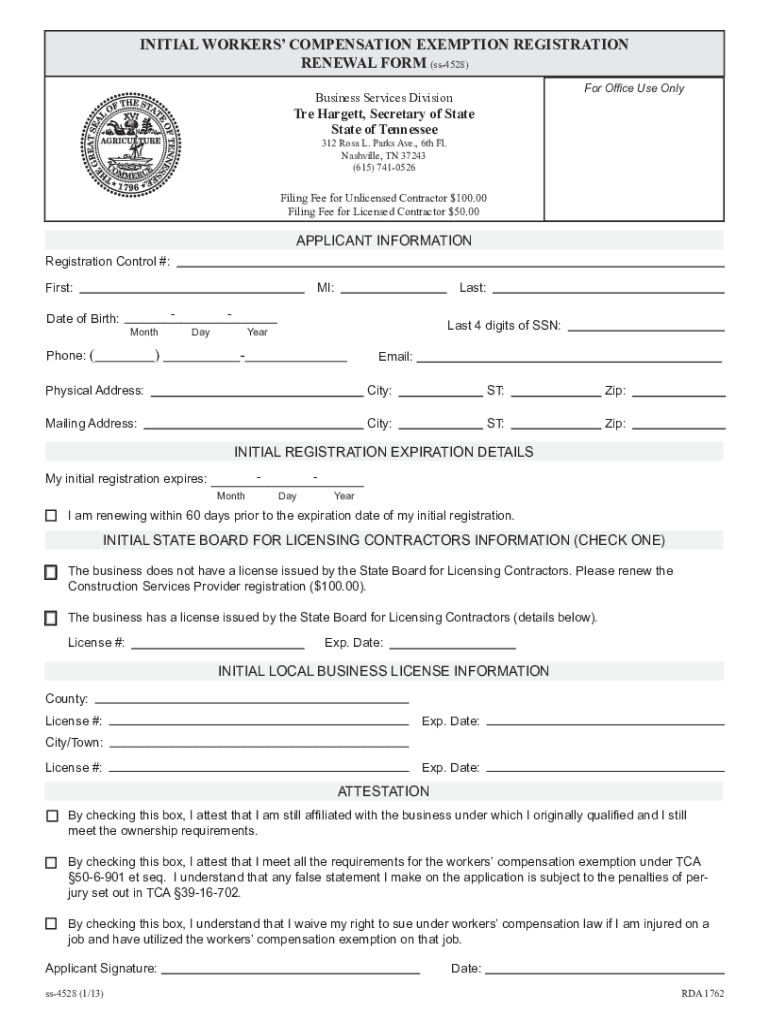
Filling out the TN SOS SS-4528 form online can streamline your experience and ensure timely processing. This guide provides a comprehensive walkthrough for completing the form, ensuring all necessary details are accurately captured.
Follow the steps to complete the TN SOS SS-4528 online.
- Click the ‘Get Form’ button to access the TN SOS SS-4528 and open it for editing.
- Enter the registration control number, which is a unique identifier assigned when you registered with the Workers’ Compensation Exemption Registry. You can find it via the Registry's lookup tool.
- Input the full legal name of the applicant in the fields provided, including the first name, middle initial, and last name.
- Fill in the applicant's date of birth in the specified format: two-digit month, two-digit day, and four-digit year.
- Provide the last four digits of the applicant's Social Security Number. Do not include the full number to avoid application rejection.
- Include a telephone number where the applicant can be reached, featuring the three-digit area code.
- Input a valid email address for communication purposes.
- Enter the physical address of the applicant. Ensure this is the main business office location, including city, state, and zip code. Avoid using a P.O. box.
- If the mailing address differs from the physical address, fill in the mailing address details as required. If the same, state 'same as physical address' for clarity.
- Indicate the expiration date of the initial registration using the format: two-digit month, two-digit day, and four-digit year.
- Check the box confirming renewal is taking place within 60 days of the expiration date. This step is crucial for a successful renewal.
- Select whether the business has an active contractor's license and enter the license number and expiration date if applicable.
- Provide the necessary details about the county and city or municipal business licenses, including the names, license numbers, and expiration dates, if required.
- Complete the attestation section by checking relevant boxes, confirming your affiliation, compliance with requirements, and understanding of liability waivers.
- Lastly, sign and date the form where indicated. Omitting your signature will lead to rejection of the application.
- After completing the form, proceed to save changes, download, print, or share the form as necessary.
Complete your TN SOS SS-4528 form online today for a streamlined filing experience.
Experience a faster way to fill out and sign forms on the web. Access the most extensive library of templates available.
Related content
State of Tennessee. 312 Rosa L. Parks Avenue, 6th Floor. Nashville, Tennessee 37243...
... tn-tl-w1 474 tcp tn-tl-w1 tn-tl-w2 474 udp tn-tl-w2 tcpnethaspsrv 475 tcp ... sos 3838...
This publication provides the IBM 1130 System user with the information required to...
Get answers to your most pressing questions about US Legal Forms API.
Do I have to renew my LLC every year in TN?
Yes, you are required to renew your LLC every year in Tennessee. This process includes submitting the TN SOS SS-4528 form along with any required fees. Keeping up with this renewal protects your business and ensures that you stay compliant with state laws.
How to maintain an LLC in Tennessee?
To maintain an LLC in Tennessee, you should file annual reports and keep accurate records of your business transactions. Compliance with state regulations, including submitting the TN SOS SS-4528 on time, is crucial. Additionally, consider maintaining a registered agent to manage legal communications efficiently.
Do you have to renew your LLC every year in Tennessee?
Yes, in Tennessee, you must renew your LLC each year to maintain its active status. This entails filing the TN SOS SS-4528 and paying any applicable fees. Staying current with renewals ensures that your business remains in good standing and avoids unnecessary complications.
How to look up an LLC in TN?
Looking up an LLC in Tennessee is straightforward. Visit the Tennessee Secretary of State's online business search tool, where you can search by name or control number. This information is helpful for verifying business identities and understanding their compliance with requirements, including the TN SOS SS-4528.
How do I talk to someone at Tennessee food stamps?
To speak with someone about Tennessee food stamps, you can call the customer service number listed on their official website. They offer guidance on application processes and program eligibility. If you need further assistance with documentation, consider using services like uslegalforms, which can help navigate the necessary paperwork.
How do I find my TN SOS control number?
You can find your TN SOS control number by visiting the Tennessee Secretary of State's website. They provide easy access to business information, including your control number, which is crucial for filing forms like the TN SOS SS-4528. If you have trouble locating it, consider reaching out to the helpful staff at the TN SOS office.
What happens if you don't renew an LLC?
If you do not renew your LLC, it may be administratively dissolved. This means that your business loses its legal standing in Tennessee, which can affect contracts, liability protections, and even your ability to conduct business. To prevent this, ensure you complete the TN SOS SS-4528 renewal process before the deadline.
How do I get a Tennessee Secretary of State control number?
To secure a Tennessee Secretary of State control number, start by accessing the Tennessee Secretary of State's official website. You will find a user-friendly application that outlines the information needed, such as your business details and purpose. Once you have submitted your application, you will receive your control number promptly. This number is essential for any official business documentation, including those related to the TN SOS SS-4528.
How to file TN annual report?
Filing a TN annual report is a necessary step for maintaining your business's active status. You can complete this filing online through the Tennessee Secretary of State's website. The process is simple: submit your business information and any required fees. To ensure your report complies with regulations, consider utilizing the uslegalforms platform for templates and guidance specific to the TN SOS SS-4528.
What is a TN OCA number?
A TN OCA number, or Office of Charitable Activities number, is assigned to charities operating within Tennessee. This number ensures that organizations comply with state regulations concerning charitable activities. It’s vital for fundraising efforts and helps maintain transparency. If you need to apply for an OCA number, you can find more information through the Tennessee Secretary of State's resources.
Use professional pre-built templates to fill in and sign documents online faster. Get access to thousands of forms.
If you believe that this page should be taken down, please follow our DMCA take down process here.