Loading
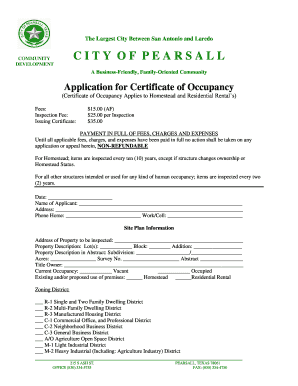
Get Application For Certificate Of Occupancy (residential) - City Of Pearsall - Cityofpearsall
How it works
-

Open form follow the instructions
-

Easily sign the form with your finger
-

Send filled & signed form or save
How to fill out the Application For Certificate Of Occupancy (Residential) - City Of Pearsall online
Filling out the Application For Certificate Of Occupancy online can be a straightforward process when you have clear guidance. This guide will provide step-by-step instructions to help you complete the application accurately and efficiently.
Follow the steps to complete your application accurately.
- Press the ‘Get Form’ button to access the application form and open it in your preferred document editor.
- Enter the date at the top of the form. This is essential to indicate when the application is being submitted.
- Fill in the name of the applicant in the designated field. Ensure that the name matches legal documentation.
- Provide the address of the applicant. This should be the current residential address.
- Input the phone numbers: home and work/cell. This will be used for any follow-up regarding the application.
- Next, provide the address of the property to be inspected. This should include the complete address to avoid any delays.
- Fill in the property description, including lot number, block number, addition, subdivision, acres, survey number, and abstract. This information is crucial for identifying the property accurately.
- List the title owner of the property. This should reflect the person or entity that holds ownership rights to the property.
- Indicate the current occupancy status by checking 'Vacant' or 'Occupied'.
- Describe the existing and/or proposed use of the premises by marking either 'Homestead' or 'Residential Rental'.
- Select the appropriate zoning district from the provided options. This determines the permitted use of the property.
- In the inspection section, leave space for compliance information to be filled in later by the inspector.
- Include any comments or additional information if necessary in the comments section.
- At the end of the form, sign and date the application, confirming that the information provided is accurate.
- Once the form is completed, you can save the changes, download, print, or share the document as required.
Ensure accurate and timely submission by following these steps to complete your documents online.
Projects that change the configuration of walls, pipes, wiring, roofs, or major appliances typically DO require at least one type of building permit. Projects that DO NOT need a building permit are simple surface (cosmetic) projects; minor repairs and replacements; and minor site improvements or small structures.
Industry-leading security and compliance
US Legal Forms protects your data by complying with industry-specific security standards.
-
In businnes since 199725+ years providing professional legal documents.
-
Accredited businessGuarantees that a business meets BBB accreditation standards in the US and Canada.
-
Secured by BraintreeValidated Level 1 PCI DSS compliant payment gateway that accepts most major credit and debit card brands from across the globe.