Loading
Get Cataract & Prosthestic Eye Assistance (lcf-vii) - Lcf24d.org - Lcf24d
How it works
-

Open form follow the instructions
-

Easily sign the form with your finger
-

Send filled & signed form or save
How to fill out the Cataract & Prosthetic Eye Assistance (lcf-VII) online
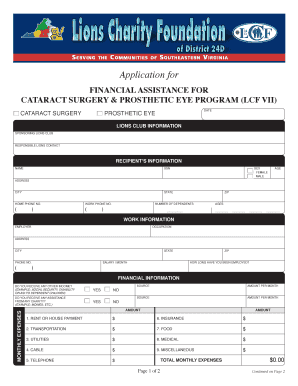
Filling out the Cataract & Prosthetic Eye Assistance form is an important step in securing financial support for cataract surgery or prosthetic eye needs. This guide will walk you through each section of the form to ensure a smooth and successful application process.
Follow the steps to complete your application seamlessly.
- Press the ‘Get Form’ button to access the Cataract & Prosthetic Eye Assistance form and open it in the editor.
- Enter the date at the top of the form for proper documentation. Make sure to use the correct date format.
- In the Lions Club Information section, provide the name of the sponsoring Lions Club and the contact information for the responsible Lions member.
- Fill out the recipient’s information with the full name, Social Security Number (SSN), address, city, state, home phone number, work phone number, age, zip code, sex, and number of dependents. Ensure all provided details are accurate.
- In the Work Information section, include your employer’s name, occupation, address, city, state, phone number, and salary per month. Indicate how long you have been employed.
- Complete the Financial Information section by specifying if you receive assistance from any charity and if you have any other sources of income. List all monthly expenses including rent, transportation, utilities, and more. Calculate and fill in the total monthly expenses.
- Indicate whether you have family members who can assist with medical payments and provide their names and how much they can help, if applicable.
- Provide information about your medical insurance, including whether you have coverage through Medicare, Medicaid, or another provider. List the plan name, policy number, and effective dates.
- Select the type of assistance needed, indicating whether it is for cataract surgery or prosthesis and detail the specific eye involved.
- If you have seen an eye care specialist, provide their name; otherwise, note who recommended the surgery or prosthesis.
- Enter the estimated cost of the required procedure and confirm the co-pay requirement, which is $100 for each eye procedure.
- Sign and date the application to authenticate your submission.
- Gather signatures from the Lions Club representative and the Indigent Chairperson, documenting the date of their visit and verifying the information provided.
- Complete the LCF action taken section with a description of actions, recommended amounts, and the date of these actions.
- Finally, ensure you email the completed application to the current foundation secretary and the LCF Indigent Eyecare Chairperson as specified in the form.
Begin your application process online today to ensure you receive the assistance you need.
Cataract symptoms include: Vision that's cloudy, blurry, foggy or filmy. Changes in the way you see color (colors may look faded or not as vivid). Sensitivity to bright sunlight, headlights or lamps. Glare, including halos or streaks that form around lights. Difficulty seeing at night.
Industry-leading security and compliance
US Legal Forms protects your data by complying with industry-specific security standards.
-
In businnes since 199725+ years providing professional legal documents.
-
Accredited businessGuarantees that a business meets BBB accreditation standards in the US and Canada.
-
Secured by BraintreeValidated Level 1 PCI DSS compliant payment gateway that accepts most major credit and debit card brands from across the globe.