Loading
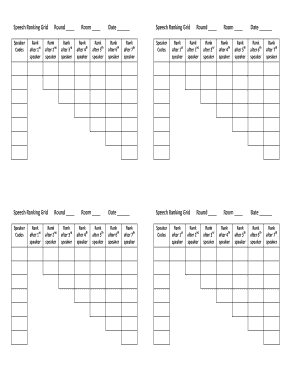
Get Speech Ranking Grid - Bhawaiispeechleaguebborgb
How it works
-

Open form follow the instructions
-

Easily sign the form with your finger
-

Send filled & signed form or save
How to use or fill out the Speech Ranking Grid - Bhawaiispeechleaguebborgb online
Filling out the Speech Ranking Grid is a crucial task for effectively ranking speakers in a given round. This guide will provide you with clear and detailed steps to ensure accurate completion of the form.
Follow the steps to complete the Speech Ranking Grid accurately.
- Click ‘Get Form’ button to obtain the form and open it in the editor.
- Begin by entering the code numbers of the speakers in the order they will present, placing the first speaker’s code in the top left box.
- After the first speaker has finished, record their ranking. For instance, assign them a ‘1’ for first place.
- Proceed to the second speaker. After their performance, assign rankings by comparing them to the first speaker, designating either a ‘1’ or ‘2’ ranking.
- Continue this process for all speakers. After each round, ensure that you update the rankings accordingly.
- Once all speakers have presented, review the complete rankings for accuracy and transfer this information onto each speaker’s colored ballot as needed.
- If provided with a quarter-sheet, ensure to record the rankings in the same order as captured in the Speech Ranking Grid.
- Finally, once you have filled out the entire Speech Ranking Grid, you can save your changes, download, print, or share the form as required.
Start filling out the Speech Ranking Grid online today for a streamlined ranking experience.