Rrent calendar year: $____________________ actual estimated Total gross wages during preceding calendar year: $__________________ actual estimated Were there other employees? No Yes - how many? ______________ Is the employer still operating? No Yes Additional comments: Section D - Quarterly Wage Information You must report the quarterly gross wages (before taxes) on the chart on the next page. There are four calendar quarters per year. The quarters are n.
Open form follow the instructions
Easily sign the form with your finger
Send filled & signed form or save
How to fill out the MI LRA UIA 1718 online
The MI LRA UIA 1718 form is essential for users who need to contest reported wages or report missing wages to the Unemployment Insurance agency. This guide will provide you with clear, step-by-step instructions to confidently navigate the online process and complete the form accurately.
Follow the steps to successfully fill out the MI LRA UIA 1718 online.
- Click the ‘Get Form’ button to access the form online and open it for completion.
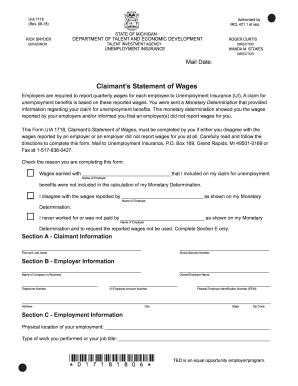
- Begin by checking the appropriate reason for filling out the form. You can indicate if you believe certain wages were excluded from your Monetary Determination, disagree with reported wages, or if you did not work for the employer listed.
- Fill in Section A with your claimant information, including your first and last name, as well as your Social Security number.
- Complete Section B with employer information. Enter the name of the company, owner or employer name, and their contact number. Make sure to include the UI employer account number and the Federal Employer Identification Number (FEIN).
- In Section C, provide details about your employment. This includes the physical location of your job, your job title, your payment method, and any additional remuneration or deductions that applied to your wages.
- Report your total gross wages for the current and preceding calendar years, marking them as actual or estimated.
- Move to Section D to report the quarterly wage information. Carefully enter your wages for each quarter and keep in mind that you should include wages based on when they were paid.
- Section E requires your certification statement. Sign and date the form, confirming that the information you provided is accurate.
- After ensuring all sections are completed and accurate, you can save your changes online, download the completed form, and print or share it as necessary.
Take action now and complete your MI LRA UIA 1718 form online to ensure your unemployment benefits are accurately considered.
Experience a faster way to fill out and sign forms on the web. Access the most extensive library of templates available.
Related content
Jul 19, 2017 — Designates a work project for unexpended funds from the $1.2 million...
Dec 21, 2024 — A Fundação Alexandre de Gusmão, instituída em 1971, é uma fundação...
Esta é uma impressora de jato de tinta, projetada para imprimir imagens de alta qualidade...
Get answers to your most pressing questions about US Legal Forms API.
What disqualifies you from unemployment in Michigan?
Several factors can disqualify you from receiving unemployment benefits in Michigan. For instance, if you voluntarily quit your job without a valid reason, or if you were terminated for misconduct, you may be ineligible. Not actively seeking work while on unemployment can also lead to disqualification. Understanding these criteria is essential for anyone navigating the MI LRA UIA 1718 landscape.
How to file a protest against unemployment in Michigan?
If you wish to file a protest against an unemployment decision in Michigan, you must do so within 30 days of receiving the determination. You can submit your protest online through the Michigan UIA portal or submit a written request stating your reasons for the appeal. Make sure to provide any relevant documentation to support your case. USLegalForms can assist you in preparing the necessary paperwork for this MI LRA UIA 1718 process.
How do I file a UIA claim in Michigan?
To file a UIA claim in Michigan, start by visiting the Michigan Unemployment Insurance Agency (UIA) website. You will need to fill out the appropriate online application form, ensuring you have your Social Security number and employment details ready. After submitting your claim, keep an eye on your email for any communication from the UIA regarding your application status, as getting timely updates is crucial. Using USLegalForms can simplify the process by providing all necessary forms and guidance.
How much unemployment will I get if I make $1000 a week in Michigan?
The amount of unemployment assistance you may receive in Michigan depends on various factors, including your previous earnings. Typically, you can expect to receive a percentage of your previous weekly wages, capped at a certain limit. For precise calculations, refer to the MI LRA UIA 1718 documentation or consult the Michigan UIA for beneficial guidance tailored to your situation.
How do I talk to a live person at Michigan unemployment?
If you need to speak with a live person at Michigan unemployment, you can call the Michigan UIA customer service number. Be prepared for potential wait times, especially during peak hours. Alternatively, consider checking the Michigan UIA website for online chat options or comprehensive FAQs that might address your questions before you reach out.
How do I file for unemployment for the first time in Michigan?
To file for unemployment for the first time in Michigan, you should visit the Michigan Unemployment Insurance Agency website. After creating an account, follow the step-by-step guidance to submit your claim. Ensure that you have your personal information and employment history ready, as this is essential for the MI LRA UIA 1718 application process.
Who is eligible for UIA Michigan?
Eligibility for UIA in Michigan generally includes individuals who have lost their jobs through no fault of their own, such as layoffs or company downsizing. You must also meet certain income and work history requirements defined by the MI LRA UIA 1718 guidelines. Be sure to review your specific situation to confirm eligibility.
How do I apply for UIA in Michigan?
Applying for UIA in Michigan is straightforward. You can visit the Michigan UIA website and follow the prompts to complete your application online. Be prepared to provide your work history and personal identification information. Remember, having your UIA number is crucial in this process under MI LRA UIA 1718.
How do I get a UiA number in Michigan?
To obtain a UIA number in Michigan, you will first need to create an account on the Michigan Unemployment Insurance Agency (UIA) website. Next, you must complete your profile and provide necessary identification details. Once your account is set up, the system will issue your UIA number, which you will need for all unemployment matters related to MI LRA UIA 1718.
What disqualifies you for unemployment in Michigan?
There are several factors that may disqualify you from receiving unemployment benefits in Michigan. Common disqualifiers include voluntarily quitting your job without just cause or being terminated due to misconduct. Understanding these criteria helps you prepare your claim accurately, particularly under the MI LRA UIA 1718 framework, to avoid potential pitfalls.
Use professional pre-built templates to fill in and sign documents online faster. Get access to thousands of forms.
If you believe that this page should be taken down, please follow our DMCA take down process here.
This form is available in several versions. Select the version you need from the drop-down list below.