Loading
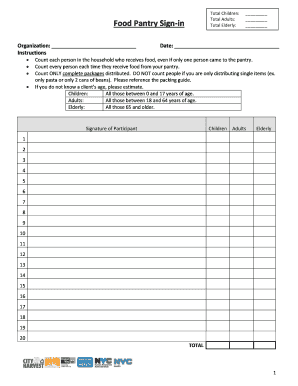
Get Food Pantry Sign-in Total Elderly - Bfeednycbborgb - Feednyc
How it works
-

Open form follow the instructions
-

Easily sign the form with your finger
-

Send filled & signed form or save
How to fill out the Food Pantry Sign-in Total Elderly - BFeedNYCbborgb - Feednyc online
Filling out the Food Pantry Sign-in Total Elderly form is essential for tracking the demographic distribution of food pantry beneficiaries. This guide provides clear and detailed instructions to assist users in completing the form accurately and efficiently.
Follow the steps to complete the online form successfully.
- Click ‘Get Form’ button to obtain the form and open it in your editing tool.
- Enter the organization name in the designated space provided at the top of the form.
- Fill in today's date to ensure accurate record-keeping.
- Count and input the total number of children, adults, and elderly individuals who received food. Remember to include each person in the household who benefits from pantry services, even if only one individual attended.
- Make sure to only include complete packages distributed, as instructed—do not count individuals if only single items were provided.
- If unsure about a client’s age, provide an estimation to categorize them correctly.
- At the bottom of each page, add the total number of children, adults, elderly, those turned away, and those who refused into the dark box marked TOTAL.
- Input the totals into the chart provided at the end of the form to summarize the total number served.
- After completing all sections, review your entries for accuracy before finalizing.
- Finally, save changes, download a copy for your records, print the form, or share it as needed.
Complete your forms online for an efficient record-keeping process.
The Food Bank for NYC reports 535 food pantries and 128 soup kitchens (663 total). The FoodHelp. nyc campaign provides a map with 420 food pantries and 112 soup kitchens (532 total) across all five boroughs.