Loading
Get Oregon Homecare Workers Trust
How it works
-

Open form follow the instructions
-

Easily sign the form with your finger
-

Send filled & signed form or save
How to fill out the Oregon Homecare Workers Trust online
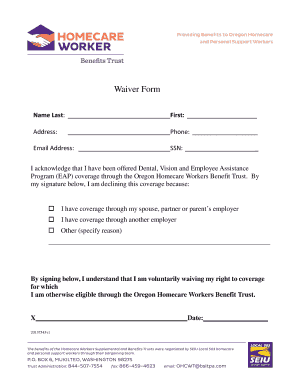
This guide provides detailed instructions on how to fill out the Oregon Homecare Workers Trust waiver form online. It is designed to assist users in understanding each component of the form, ensuring a smooth completion process.
Follow the steps to accurately complete the waiver form
- Click ‘Get Form’ button to access the waiver form and open it for editing.
- Fill in your last name in the designated field to identify yourself.
- Enter your first name in the corresponding field to complete your identifying information.
- Provide your full address in the address field to allow for accurate correspondence.
- Input your phone number in the space provided to ensure contact availability if needed.
- Enter your email address in the appropriate field, which is important for digital communication.
- Fill in your social security number (SSN) in the specified field to verify your identity.
- Acknowledge that you have been offered coverage through the Oregon Homecare Workers Benefit Trust and select your reason for declining coverage by checking the appropriate box. Options include having coverage through a spouse, partner, or parent's employer, or through another employer. If selecting 'Other,' please specify your reason.
- By signing below, you will confirm your understanding that you are voluntarily waiving your right to the coverage offered. Ensure to date your signature.
- Once all fields are completed, save your changes, and consider options to download, print, or share the completed form.
Complete your Oregon Homecare Workers Trust waiver form online today for a hassle-free experience.
Related links form
How much does a DHS make in Oregon? As of Mar 24, 2023, the average annual pay for the DHS jobs category in Oregon is $90,212 a year.