Loading
Get Da 1256 2009-2026
How it works
-

Open form follow the instructions
-

Easily sign the form with your finger
-

Send filled & signed form or save
How to fill out the DA 1256 online
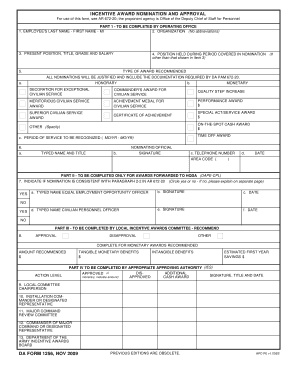
The DA 1256 is an important form used for nominating individuals for incentive awards. This guide will help you navigate the process of filling out the form online, ensuring you provide all necessary information accurately and efficiently.
Follow the steps to complete the DA 1256 online.
- Press the ‘Get Form’ button to access the DA 1256 and open it in your preferred editor.
- In Part 1, fill in the employee's last name, first name, and middle initial in the designated fields.
- Enter the organization name without using any abbreviations in the next field.
- Provide the present position, title, grade, and salary of the employee in the appropriate section.
- If the employee held a different position during the nomination period, note that position in the designated field.
- Indicate the type of award recommended by selecting one from the provided list, such as honorary, monetary, or specific awards like Achievement Medal for Civilian Service.
- Clearly state the period of service to be recognized, formatting it as month/year to month/year.
- Complete the section for the nominating official by typing their name, title, and providing their signature, telephone number, and the date.
- If applicable, move to Part II to confirm whether the nomination aligns with the stated paragraph in AR 672-20 by marking 'yes' or 'no'.
- In Part III, await recommendations from the local incentive awards committee about their approval or disapproval of the nomination.
- If the nomination is for monetary awards, provide the recommended amount and any tangible or intangible benefits in the relevant fields.
- Finally, ensure all necessary signatures and dates are completed by the appropriate approving authorities in Part IV.
- After filling out all sections of the form, save your changes, download a copy for your records, print for submission, or share it as needed.
Begin filling out your DA 1256 online today!
To report Section 1256 on your tax return, utilize IRS Form 6781, which is specifically designed for reporting gains and losses from the sale of certain futures and options contracts. Fill out the form carefully, and attach it to your annual tax return. This reporting ensures that you comply with tax regulations while maximizing your tax benefits.