Loading
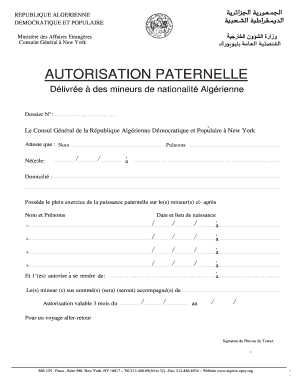
Get Consulat D'algérie à New York
How it works
-

Open form follow the instructions
-

Easily sign the form with your finger
-

Send filled & signed form or save
How to fill out the Consulat D'algérie à New York online
Filling out the Consulat D'algérie à New York form can seem challenging, especially for those unfamiliar with the process. This guide provides clear, step-by-step instructions to assist users in completing the form accurately and efficiently.
Follow the steps to successfully complete your form online.
- Click 'Get Form' button to obtain the form and open it in the editor.
- Begin by filling in the dossier number in the designated field, ensuring that you provide the correct reference for your application.
- In the next section, write the name and first name of the minor who is the subject of the authorization. Be sure to spell names correctly.
- Specify the date and place of birth for the minor. This information is essential for identification purposes.
- In the following section, provide the complete address of the minor's residence. Ensure clarity and accuracy.
- List the names and dates of birth of all minors covered by this authorization. This section will require you to repeat the process for each minor.
- Indicate the destination of the minors' travel. This portion must be filled out specifically and clearly.
- State the name of the person who will accompany the minors during their journey, ensuring the individual is reliable and pertinent to the travel.
- Complete the validity dates for the authorization, making sure to indicate the start and end dates correctly.
- Finally, sign the form on behalf of the father or guardian, confirming that you have the authority to grant this authorization.
- Once all fields are filled, you can save changes, download, print, or share the form as necessary.
Complete your Consulat D'algérie à New York documentation online today.
How to Convert PDF Files to Excel Without Software? Go to Nanonets PDF to Excel Tool. Upload your PDF file or drag and drop your PDF file into the box. Select “Convert to Excel” to start the PDF conversion process. After a few seconds, your Excel file will be automatically downloaded.