Loading
Get Mbfg Closing Instructions/ Escrow Instructions Letter - Loanstream ...
How it works
-

Open form follow the instructions
-

Easily sign the form with your finger
-

Send filled & signed form or save
How to fill out the MBFG Closing Instructions/ Escrow Instructions Letter - LoanStream online
Completing the MBFG Closing Instructions/ Escrow Instructions Letter - LoanStream online can be a straightforward process if you follow the right steps. This guide provides clear guidance to ensure you accurately fill out each section of the document.
Follow the steps to successfully complete the instructions letter.
- Click the ‘Get Form’ button to download the form and open it in your preferred editing software.
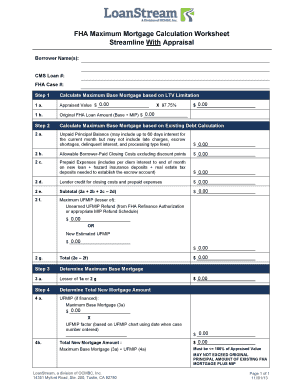
- Begin by filling in the Borrower Name(s) field with the names of all borrowers involved in the transaction.
- Next, enter the CMS Loan # in the designated field to identify your specific loan.
- Input the FHA Case # to associate the document with your FHA transaction.
- Proceed to calculate and enter the Maximum Base Mortgage based on the LTV Limitation. Fill in the Appraised Value and Original FHA Loan Amount as required.
- Move on to the Existing Debt Calculation section. Input the Unpaid Principal Balance and ensure to factor in appropriate details while excluding any disallowed fees.
- Complete the sections for Allowable Borrower-Paid Closing Costs and Prepaid Expenses, entering accurate amounts as applicable.
- Calculate the Subtotal of the Previous values and determine the Maximum UFMIP from your FHA Refinance Authorization or MIP Refund Schedule.
- Finalize the Total by comparing values from previous steps and calculate the Maximum Base Mortgage.
- Finally, review all entered information carefully, then save changes, download, or print the completed form as needed.
Start completing your MBFG Closing Instructions/ Escrow Instructions Letter online today for a smoother transaction process!
Related links form
How to convert PDF to PDF/A-1A Open free PDF website and choose Convert application. Click inside the file drop area to upload or drag & drop files. You can upload maximum 10 files for the operation. Click on Convert button. ... Download link of result files will be available instantly after conversion.