Loading
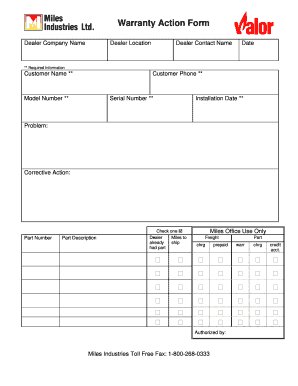
Get Warranty Action Form - Valor Fireplaces
How it works
-

Open form follow the instructions
-

Easily sign the form with your finger
-

Send filled & signed form or save
How to fill out the Warranty Action Form - Valor Fireplaces online
Filling out the Warranty Action Form for Valor Fireplaces is an essential step in addressing any issues with your fireplace installation. This guide will provide you with a clear and structured process for completing the form online, ensuring that you provide all necessary information effectively.
Follow the steps to successfully complete the Warranty Action Form.
- Click ‘Get Form’ button to obtain the form and open it for editing.
- Enter the dealer company name in the designated field. This information helps identify your point of contact for warranty actions.
- Fill in the dealer location, including city and state, to ensure clarity about where the services were rendered.
- Provide the dealer contact name. This should be the individual who can be contacted regarding the warranty claim.
- Input the date when you are filling out the form. This helps in the tracking and processing of your warranty submission.
- Complete the required fields for customer information. Enter the customer name, phone number, and ensure to mark these as essential for processing.
- Specify the model number of the fireplace in the relevant section to avoid processing delays.
- Enter the serial number of the fireplace. This is usually located on the unit and is critical for warranty verification.
- Provide the installation date of the fireplace. This information helps determine warranty eligibility.
- Describe the problem you are experiencing with the fireplace. Be as detailed as possible to assist in the assessment.
- Outline the corrective action being requested. This helps the dealer understand your expectations.
- If applicable, enter the part number and part description for any replacement parts you are seeking.
- Select the appropriate checkbox for your needs (Dealer, already had part, or miles to ship) to specify the shipping preferences.
- Complete any additional fields as necessary, such as freight charges and authorization details.
- Before finalizing, review the entire form for accuracy. After confirming all entries, save changes, and use options to download, print, or share the form as needed.
Complete the Warranty Action Form online today for a seamless warranty experience.
Locate your Serial Number Remove barrier screen from unit. Remove right side panel from unit. The Fireplace and Lighting information is located on a card to the right hand side of the fireplace box. The Fireplace and Lighting card will provide your model and serial number as shown in the image.