Loading
Get Residential Application Lake Apopka Natural Gas District - Langd
How it works
-

Open form follow the instructions
-

Easily sign the form with your finger
-

Send filled & signed form or save
How to fill out the Residential Application Lake Apopka Natural Gas District - Langd online
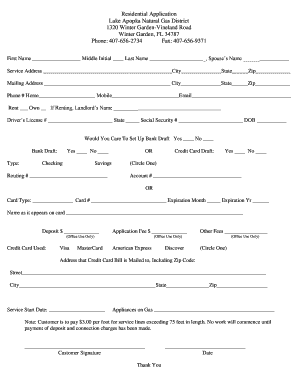
Completing the Residential Application for the Lake Apopka Natural Gas District is an essential step for residents seeking natural gas service. This guide will provide you with clear, step-by-step instructions to help you fill out the application form accurately and efficiently online.
Follow the steps to successfully complete your application online.
- Click ‘Get Form’ button to obtain the application and open it for editing.
- Begin by filling in your personal details. Enter your first name, middle initial, last name, and your partner’s name, if applicable, in the designated fields.
- Provide the service address where you will be receiving gas service, including the city, state, and zip code.
- If your mailing address is different from the service address, please enter it in the respective fields, including city, state, and zip code.
- Fill in your contact information, including home and mobile telephone numbers, as well as your email address.
- Indicate whether you rent or own the property. If you are renting, enter your landlord’s name in the specified field.
- Provide your driver's license number, the state it was issued in, your social security number, and your date of birth.
- Decide if you would like to set up a bank draft for payments. Choose 'Yes' or 'No'. If yes, specify the type of account you are using.
- For bank draft, fill in the routing number and specify if you will be using a checking or savings account. Alternatively, if you opt for credit card draft, indicate 'Yes' or 'No' and provide the account number.
- Complete the credit card information by filling in the card type, card number, expiration month and year, and the name as it appears on the card.
- Enter the deposit amount and the application fee in the provided fields.
- Provide the address where your credit card bill is mailed, including street, city, state, and zip code.
- Select your desired service start date and list any gas appliances you plan to use.
- Review all the information entered to ensure it is accurate before completing the application.
- Sign and date the application to verify your consent and submit your application online.
Complete your Residential Application online today to ensure timely service.
Both Central Florida Gas and Florida Public Utilities are proud to operate under 'parent company' Chesapeake Utilities. Please visit the FPU web site for virtually everything you need to know about your energy service, including: Payment and account information.
Industry-leading security and compliance
US Legal Forms protects your data by complying with industry-specific security standards.
-
In businnes since 199725+ years providing professional legal documents.
-
Accredited businessGuarantees that a business meets BBB accreditation standards in the US and Canada.
-
Secured by BraintreeValidated Level 1 PCI DSS compliant payment gateway that accepts most major credit and debit card brands from across the globe.