Loading
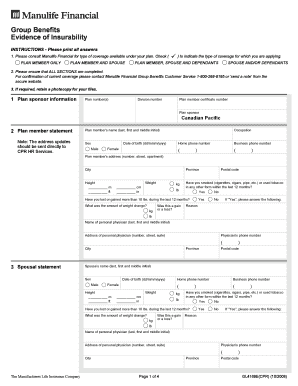
Get Group Benefits Evidence Of Insurability Instructions Please Print All Answers 1
How it works
-

Open form follow the instructions
-

Easily sign the form with your finger
-

Send filled & signed form or save
How to fill out the Group Benefits Evidence Of Insurability instructions online
Filling out the Group Benefits Evidence of Insurability form is an essential step in applying for your insurance coverage. This guide will provide you with a clear and concise walkthrough to ensure that you complete the form accurately and efficiently.
Follow the steps to successfully complete your application.
- Press the ‘Get Form’ button to access the form. Once you have the form, open it in the editor provided for online completion.
- Start by indicating the type of coverage you are applying for. Check the relevant boxes that correspond to: PLAN MEMBER ONLY, PLAN MEMBER AND SPOUSE, SPOUSE AND/OR DEPENDANTS, or PLAN MEMBER, SPOUSE AND DEPENDANTS. Make sure this information is accurate.
- Complete all sections of the form thoroughly. If you need assistance or confirmation of current coverage, you can reach out to Manulife Financial Group Benefits Customer Service at 1-800-268-6195 or use the messaging feature on their secure website.
- Fill in the Plan Member Information section, which includes details like your name, sex, date of birth, occupation, phone numbers, and address. Don’t forget to provide your height and weight.
- Respond to the health questions, particularly regarding tobacco use and any significant weight changes over the past year. Provide details if you answered 'yes' to any question.
- Complete the Spousal Statement section similarly, providing the same details required for your spouse. Ensure accuracy in height, weight, and health-related questions.
- For dependents, repeat the process. You must provide the requested information for each dependent being insured, including any children. If more than three children are included, attach a separate signed sheet.
- Answer the Medical Questions section on behalf of all applicants thoroughly. Provide detailed explanations for any 'yes' answers; if you need extra space, you may attach a signed separate sheet.
- Complete the Certification and Authorization section. Read the statements carefully and sign where indicated. Ensure you date the form correctly.
- After your form is completed, save any changes and download it for your records. You can then print it out or share it as needed. Finally, send the form to Manulife Financial at the provided address.
Start your application process by completing your Group Benefits Evidence of Insurability form online today.
How to Submit an EOI Your group number. Your employer's name/address. The reason the EOI is required. The type and amount of coverage you are requesting. Your name, date of birth, and Social Security number. Your height and weight. Your most recent pulse and blood pressure information.
Industry-leading security and compliance
US Legal Forms protects your data by complying with industry-specific security standards.
-
In businnes since 199725+ years providing professional legal documents.
-
Accredited businessGuarantees that a business meets BBB accreditation standards in the US and Canada.
-
Secured by BraintreeValidated Level 1 PCI DSS compliant payment gateway that accepts most major credit and debit card brands from across the globe.