Loading
Get Notary Public
How it works
-

Open form follow the instructions
-

Easily sign the form with your finger
-

Send filled & signed form or save
How to fill out the Notary Public online
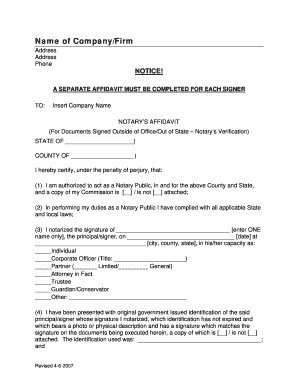
Filling out the Notary Public affidavit online is a straightforward process that ensures proper documentation of notarizations. This guide will provide you with clear, step-by-step instructions tailored for users of all experience levels.
Follow the steps to complete the Notary Public affidavit online.
- Press the ‘Get Form’ button to access the Notary Public affidavit and open it in your document editor.
- Begin by filling in the name and address of the company or firm that requires notarization at the top of the form. Ensure that the contact phone number is included for reference.
- In the section titled 'NOTICE!', remember that a separate affidavit must be completed for each signer. This is critical for accurate record-keeping.
- Proceed to the 'STATE OF' and 'COUNTY OF' sections. Enter the appropriate state and county where the notarization is taking place.
- Certify your status as a Notary Public by indicating whether a copy of your Commission is attached by checking the appropriate box.
- Verify that you have complied with all applicable state and local laws by confirming this in the affidavit.
- Fill in the principal/signer’s name in the designated space, ensuring to enter only one name. Also include the date and location (city, county, state) of the notarization.
- Select the capacity in which the signer is acting from the provided options. If applicable, fill in the title or specify 'Other' and describe the role.
- Input details about the government-issued identification presented by the signer, making sure to check whether a copy is attached.
- Document the title and date of the notarized documents in the provided space.
- Finally, date the affidavit, sign it as the Notary Public, and provide your name, address, telephone number, and email. Remember to attach any necessary documents such as your commission and the signer’s identification.
- Once you have completed all sections, save your changes, and proceed to download, print, or share the form according to your needs.
Start completing your Notary Public documents online today for efficient and accurate notarization.
How much does it cost to become a Notary in New York? The application costs $60 and the written exam is $15. Prices for optional items, such as education, an E&O insurance policy and Notary seals, vary depending on the Notary vendor you choose.
Industry-leading security and compliance
US Legal Forms protects your data by complying with industry-specific security standards.
-
In businnes since 199725+ years providing professional legal documents.
-
Accredited businessGuarantees that a business meets BBB accreditation standards in the US and Canada.
-
Secured by BraintreeValidated Level 1 PCI DSS compliant payment gateway that accepts most major credit and debit card brands from across the globe.