Loading
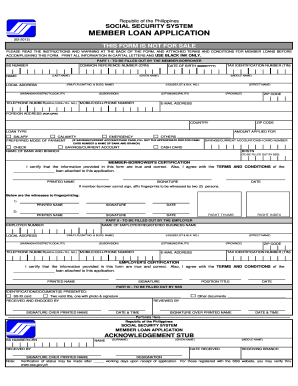
Get Ph Sss Member Loan Application 2013
How it works
-

Open form follow the instructions
-

Easily sign the form with your finger
-

Send filled & signed form or save
How to fill out the PH SSS Member Loan Application online
Filling out the PH SSS Member Loan Application online can be a straightforward process if you follow the necessary steps carefully. This guide will provide you with clear instructions on how to complete the form, ensuring that all required information is accurately submitted.
Follow the steps to complete the online application:
- Press the ‘Get Form’ button to access the loan application form and open it in your editor.
- Complete 'Part I - To be filled out by the member-borrower'. This includes providing your Social Security number, Common Reference Number (CRN), full name, date of birth, local address, and contact information. Ensure you fill out each field accurately.
- Indicate your loan type by selecting from the available options: Salary, Calamity, Emergency, or Others. Clearly state the amount you are applying for.
- Choose your preferred mode of payment (Cash Card, Savings/Current Account, or Check). If you select Cash Card, include the card number and bank details.
- In the 'Member-Borrower’s Certification' section, print your name, provide your signature, and date the application. If you cannot sign, affix your fingerprint in the specified area, ensuring it is witnessed by two individuals.
- Part II of the application must be filled out by your employer. They will provide the employer number, name, local address, and contact information. Your employer must also certify the information by signing and dating the form.
- Once both parts are completed and all information is verified, you can save your changes. Ensure that the conflicts are resolved and everything appears correct before finalizing.
- Save or download the completed form, and inspect it for completeness. If you need to, you can print a copy for your records or share it as needed.
Begin your application today by filling out the PH SSS Member Loan Application online.
Get form
Experience a faster way to fill out and sign forms on the web. Access the most extensive library of templates available.
Member Loan Application Form. SSS digitized ID or E-6 (acknowledgement stub) with any two valid IDs, one of which with recent photo. Unexpired Driver's License. Professional Regulation Commission (PRC) ID card. Passport. Postal ID. School or Company ID. Tax Identification Number (TIN) card.
Get This Form Now!
Use professional pre-built templates to fill in and sign documents online faster. Get access to thousands of forms.