Loading
Form preview
  • US Legal Forms
  • Form Library
  • More Forms
  • More Uncategorized Forms
  • Peds Response Form

Get Peds Response Form

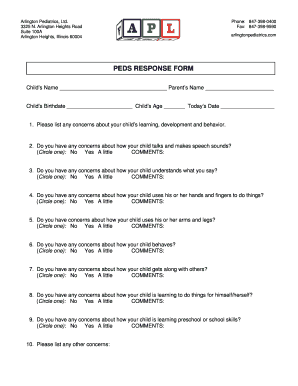
Arlington Pediatrics, Ltd. 3325 N. Arlington Heights Road Suite 100A Arlington Heights, Illinois 60004 Phone: 8473980400 Fax: 8473989590 arlingtonpediatrics.com PEDS RESPONSE FORM Childs Name Parents.

How it works

  1. Open form

    Open form follow the instructions

  2. Easily sign form

    Easily sign the form with your finger

  3. Share form

    Send filled & signed form or save

How to fill out the Peds Response Form online

Filling out the Peds Response Form is an important step in assessing your child's developmental needs. This guide provides easy-to-follow instructions for completing the form online, ensuring a smooth and efficient process.

Follow the steps to complete the form seamlessly.

  1. Press the ‘Get Form’ button to access the Peds Response Form and open it in your designated editor.
  2. Begin by entering your child’s name and your name in the designated fields at the top of the form.
  3. Fill in your child’s birthdate and age to provide context for their developmental information.
  4. Indicate any concerns regarding your child’s learning, development, and behavior in the first section. Be as detailed as possible to help healthcare professionals understand your perspective.
  5. In the next sections, answer the questions regarding your child’s communication skills. Circle 'No', 'Yes', or 'A little' for each question about speech and understanding.
  6. Continue with the form by addressing your concerns about your child’s motor skills, including their ability to use hands and arms, as well as their behavior and social interactions.
  7. Complete the section regarding your child's self-help skills and school-related skills, using the same format for responses.
  8. Finally, use the last space to list any additional concerns you may have. This is an important opportunity to provide further context.
  9. Once all fields are filled out, review the information for accuracy.
  10. You can then save the changes made to the form, download it for your records, print it, or share it as needed.

Start filling out the Peds Response Form online today for a thorough assessment of your child's needs.

Get form

Experience a faster way to fill out and sign forms on the web. Access the most extensive library of templates available.
Get form

Related content

Patent Examination Data System (PEDS) - PEDS...
... Response to Non-Final Office Action Entered and Forwarded to Examiner ... Ex parte...
Learn more
Developmental Screening/Testing Coding Fact Sheet...
Jan 20, 2005 — Milestone Screen), with interpretation and report. The use of...
Learn more
Glasgow Coma Scale - CDC
Motor Response. • Obeys commands for movement 6 points. • Purposeful movement to...
Learn more

Related links form

Trademark Renewal Application - Arizona Secretary Of State ... Financial Disclosure Forms - Arizona Secretary Of State - Azsos Name Change Form For Arizona Contracted Fundraiser Bond - Arizona Secretary Of State - Azsos

Questions & Answers

Get answers to your most pressing questions about US Legal Forms API.

Contact support

Parents' Evaluation of Developmental Status (PEDS) is the only evidence-based screen that elicits and addresses parents concerns about children's language, motor, self-help, early academic skills, behavior and social-emotional/mental health.

The PEDS:DM Assessment Level enables a detailed look at each developmental domain, i.e., expressive language, receptive language, fine motor, gross motor, self-help, social-emotional, and for older children, math and reading skills.

Parents' Evaluation of Developmental Status (PEDS) is an evidence-based method for detecting and addressing developmental and behavioural problems in children aged from birth to seven years and 11 months. PEDS is a simple, 10-item questionnaire that is completed by the parent.

Developmental Screening The American Academy of Pediatrics (AAP) recommends developmental and behavioral screening for all children during regular well-child visits at these ages: 9 months. 18 months. 30 months.

The American Academy of Pediatrics (AAP) recommends developmental and behavioral screening for all children during regular well-child visits at these ages: 9 months. 18 months. 30 months.

PEDS Response Form is a 10-item questionnaire completed by the parents as the first step in the PEDS assessment. Parents may complete this questionnaire at home, in the waiting room or in consultation with their practitioner.

PEDS: Developmental Milestones ( PEDS:DM ) — a surveillance and screening tool for children 0 – 8 that enables a swift view of children's skills in development and mental health, including expressive and receptive language, fine and gross motor skills, self-help, academics, and social-emotional skills.

The PEDS:DM Assessment Level enables a detailed look at each developmental domain, i.e., expressive language, receptive language, fine motor, gross motor, self-help, social-emotional, and for older children, math and reading skills.

Get This Form Now!

Use professional pre-built templates to fill in and sign documents online faster. Get access to thousands of forms.
Get form
If you believe that this page should be taken down, please follow our DMCA take down processhere.

Industry-leading security and compliance

US Legal Forms protects your data by complying with industry-specific security standards.
  • In businnes since 1997
    25+ years providing professional legal documents.
  • Accredited business
    Guarantees that a business meets BBB accreditation standards in the US and Canada.
  • Secured by Braintree
    Validated Level 1 PCI DSS compliant payment gateway that accepts most major credit and debit card brands from across the globe.
Get Peds Response Form
Get form
  • Adoption
  • Bankruptcy
  • Contractors
  • Divorce
  • Home Sales
  • Employment
  • Identity Theft
  • Incorporation
  • Landlord Tenant
  • Living Trust
  • Name Change
  • Personal Planning
  • Small Business
  • Wills & Estates
  • Packages A-Z
  • Affidavits
  • Bankruptcy
  • Bill of Sale
  • Corporate - LLC
  • Divorce
  • Employment
  • Identity Theft
  • Internet Technology
  • Landlord Tenant
  • Living Wills
  • Name Change
  • Power of Attorney
  • Real Estate
  • Small Estates
  • Wills
  • All Forms
  • Forms A-Z
  • Form Library
  • Legal Hub
  • About Us
  • Help Portal
  • Legal Resources
  • Blog
  • Affiliates
  • Contact Us
  • Delete My Account
  • Site Map
  • Industries
  • Forms in Spanish
  • Localized Forms
  • State-specific Forms
  • Forms Kit
  • Real Estate Handbook
  • All Guides
  • Notarize
  • Incorporation services
  • For Consumers
  • For Small Business
  • For Attorneys
  • USLegal
  • FormsPass
  • pdfFiller
  • signNow
  • altaFlow
  • DocHub
  • Instapage
Form Packages
  • Adoption
  • Bankruptcy
  • Contractors
  • Divorce
  • Home Sales
  • Employment
  • Identity Theft
  • Incorporation
  • Landlord Tenant
  • Living Trust
  • Name Change
  • Personal Planning
  • Small Business
  • Wills & Estates
  • Packages A-Z
Form Categories
  • Affidavits
  • Bankruptcy
  • Bill of Sale
  • Corporate - LLC
  • Divorce
  • Employment
  • Identity Theft
  • Internet Technology
  • Landlord Tenant
  • Living Wills
  • Name Change
  • Power of Attorney
  • Real Estate
  • Small Estates
  • Wills
  • All Forms
  • Forms A-Z
  • Form Library
Customer Service
  • Legal Hub
  • About Us
  • Help Portal
  • Legal Resources
  • Blog
  • Affiliates
  • Contact Us
  • Delete My Account
  • Site Map
  • Industries
  • Forms in Spanish
  • Localized Forms
  • State-specific Forms
  • Forms Kit
Legal Guides
  • Real Estate Handbook
  • All Guides
Prepared for you
  • Notarize
  • Incorporation services
Our Customers
  • For Consumers
  • For Small Business
  • For Attorneys
Our Sites
  • USLegal
  • FormsPass
  • pdfFiller
  • signNow
  • altaFlow
  • DocHub
  • Instapage
Social Media
Call us now toll free:
+1 833 426 79 33
As seen in:
© Copyright 1999-2026 airSlate Legal Forms, Inc. 3720 Flowood Dr, Flowood, Mississippi 39232
  • Your Privacy Choices
  • Terms of Service
  • Privacy Notice
  • Content Takedown Policy
  • Bug Bounty Program