Get Da 4949 1982-2026
How it works
-

Open form follow the instructions
-

Easily sign the form with your finger
-

Send filled & signed form or save
How to fill out the DA 4949 online
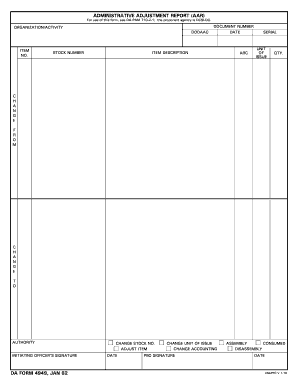
The DA 4949 form, also known as the Administrative Adjustment Report, is essential for reporting adjustments in inventory. This guide provides a step-by-step approach to filling out the form online, ensuring clarity and ease for all users.
Follow the steps to complete the DA 4949 successfully.
- Click the ‘Get Form’ button to access the DA 4949 form. You will be prompted to open the document for editing.
- Begin by filling in the 'Organization/Activity' section, which captures the DODAAC (Department of Defense Activity Address Code) associated with your unit or activity.
- In the 'Item No.' field, provide the specific identification number for the item in question. This is essential for accurate inventory tracking.
- Fill in the 'Stock Number' field, which represents the unique identifier for the item in your inventory management system.
- Enter the 'Document Number' in the appropriate field, followed by the 'Date' of the adjustment report to ensure proper documentation and record-keeping.
- Provide a clear 'Item Description' that outlines the specifics of the item being adjusted, ensuring users understand the nature of the change.
- In the 'ARC' section, indicate the appropriate Accounting Requirement Code relevant to the adjustment.
- Complete the 'Serial' field if applicable to your item, which may provide additional tracking information.
- Specify the 'Unit of Issue' which denotes how the item is measured, e.g., each, box, etc.
- Enter the quantity ('QTY.') of the item being reported to facilitate correct inventory management.
- In the 'Change From' and 'Change To' sections, clearly note the previous and new stock numbers or relevant data associated with the adjustment.
- Ensure that the 'Authority' and 'Initiating Officer's Signature' fields are appropriately signed and dated to validate the report.
- If applicable, have the 'PBO Signature' signed to confirm the changes to the inventory.
- Review all entries for accuracy before finalizing. Once the document is complete, save changes, and you can choose to download, print, or share the DA 4949 form as needed.
Complete your DA 4949 form online today and streamline your inventory adjustments.
Related links form
The DA form used for an award is the DA 4949, which captures the detailed accomplishments of a soldier eligible for recognition. By completing this form, soldiers provide documentation that supports their commendations, thereby facilitating the approval process for awards. It is important to accurately fill out the DA 4949 to depict a soldier's achievements effectively. To navigate the nuances of this form, you might find the tools offered by uslegalforms beneficial.