Loading
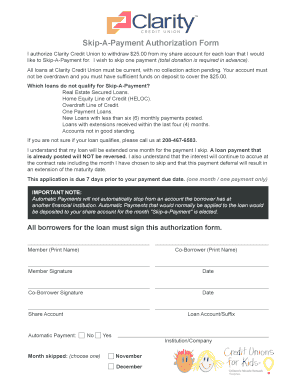
Get Skip-a-payment Authorization Form - Clarity Credit
How it works
-

Open form follow the instructions
-

Easily sign the form with your finger
-

Send filled & signed form or save
How to fill out the Skip-A-Payment Authorization Form - Clarity Credit online
Filling out the Skip-A-Payment Authorization Form with Clarity Credit is a straightforward process designed to assist users in managing their loan payments. This guide will provide you with step-by-step instructions to ensure you complete the form accurately and efficiently.
Follow the steps to successfully complete the form.
- Click the ‘Get Form’ button to access the Skip-A-Payment Authorization Form and open it within the editor.
- Begin by entering your full name in the 'Member (Print Name)' field. This identifies the primary user authorized to skip a payment.
- If applicable, enter the co-borrower's full name in the 'Co-Borrower (Print Name)' field to include them in the authorization process.
- Sign the form in the 'Member Signature' field. Ensure your signature matches the one on file with Clarity Credit.
- If a co-borrower is included, they must also sign in the 'Co-Borrower Signature' field, along with the date of signature.
- In the 'Share Account' section, provide the details of the share account from which the $25.00 will be withdrawn for each loan.
- Indicate if you currently have an automatic payment set up for the loan by selecting 'Yes' or 'No.'
- Select the 'Loan Account/Suffix' where the payment deferral will apply. Specify which month you would like to skip by selecting either November or December.
- Before finalizing, review all entries for accuracy to ensure there are no mistakes. It is crucial that the form is filled out completely.
- Once finished, save your changes, and you can choose to download, print, or share the form as needed.
Complete your Skip-A-Payment Authorization Form online today to manage your financial commitments effectively.
GreenState Online Banking Account Security Security alerts are a valuable tool that help members avoid fraud and keep your accounts and funds secure. GreenState Online Banking will automatically notify you when new or potentially suspicious activity is seen on your online banking activity.
Industry-leading security and compliance
US Legal Forms protects your data by complying with industry-specific security standards.
-
In businnes since 199725+ years providing professional legal documents.
-
Accredited businessGuarantees that a business meets BBB accreditation standards in the US and Canada.
-
Secured by BraintreeValidated Level 1 PCI DSS compliant payment gateway that accepts most major credit and debit card brands from across the globe.