Loading
Get Nrccf
How it works
-

Open form follow the instructions
-

Easily sign the form with your finger
-

Send filled & signed form or save
How to fill out the Nrccf online
Filling out the Nrccf online is a straightforward process that requires attention to detail. This guide will assist you in understanding each section of the form to ensure accurate completion.
Follow the steps to successfully complete the Nrccf online.
- Click ‘Get Form’ button to access the Nrccf and open it for editing.
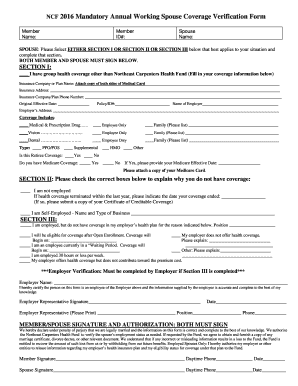
- Begin with your member information. Enter your name and member ID number in the appropriate fields to identify yourself clearly.
- Next, provide your spouse's name in the designated field.
- Choose either Section I, Section II, or Section III that best applies to your situation. Follow the instructions specific to the section you select.
- If you select Section I, provide details about your group health coverage, including the insurance company name, address, phone number, and policy information.
- Indicate the type of coverage you possess, checking all relevant boxes for medical, vision, and dental coverage, and specify if it is retiree coverage or if you have Medicare coverage.
- If you choose Section II, indicate why you do not have coverage by checking the relevant boxes and providing additional information if necessary.
- For Section III, explain the situation regarding your employment and health coverage status, including if you are in a waiting period or your employer does not offer health coverage.
- Ensure the employer verification section is filled out by your employer if you indicated coverage issues in Section III.
- Both you and your spouse must read and sign the Member/Spouse Signature and Authorization section at the bottom, confirming the accuracy of the information provided.
- Once you have filled out the form, review it for any errors. Save your changes, and you will have the option to download, print, or share the completed document as needed.
Complete your Nrccf online today to ensure your information is accurately submitted.
Carpenters' Benefits Funds of Philadelphia & Vicinity is a union pension fund based in Philadelphia, Pennsylvania. Established in 1964, the plans provide death, retirement, and pension benefits to its members. The assets of the plan are managed by the executive management team.