Loading
Get Ebanker
How it works
-

Open form follow the instructions
-

Easily sign the form with your finger
-

Send filled & signed form or save
How to use or fill out the Ebanker online
Filling out the Ebanker form online can be a straightforward process if you follow the steps carefully. This guide provides a detailed walkthrough of each section of the Ebanker registration forms, ensuring that all necessary information is submitted accurately and efficiently.
Follow the steps to complete the Ebanker registration form successfully.
- Click ‘Get Form’ button to obtain the form and open it in the editor.
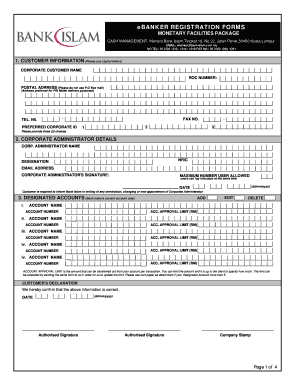
- In the Customer Information section, fill in the corporate customer name, ROC number, and postal address in capital letters. Ensure the postal address is suitable for PIN Mailer delivery, and include a valid telephone number and fax number.
- Next, complete the Corporate Administrator Details by providing the name, NRIC, designation, and email address of the corporate administrator. Don't forget to sign and date this section, specifying the maximum number of users allowed to access the account concurrently.
- In the Designated Accounts section, list the Bank Islam current account(s) you wish to include. For each account, provide the account name, account number, and the approval limit per transaction. If you have more than five designated accounts, attach them on separate paper.
- Proceed to fill out the Authorisers Details section. Provide the names, NRIC, designations, and email addresses for each authoriser. Attach photocopies of identification for each authoriser and include a cheque for payment for Smart Card Services if applicable.
- In the Stamp Duty Charge section, authorize Bank Islam to debit the applicable stamp duty charge from your designated account.
- Complete the Letter of Instruction where you authorize the bank to debit the eBanker subscription fee monthly from your current account.
- Choose your product profile selection by ticking the relevant services you wish to subscribe to, ensuring that you confirm the information is correct with your signatures and company stamp.
- Lastly, ensure all sections are reviewed for accuracy before saving, downloading, printing, or sharing the completed form as needed.
Complete your Ebanker registration form online today to enjoy seamless banking services.
Industry-leading security and compliance
US Legal Forms protects your data by complying with industry-specific security standards.
-
In businnes since 199725+ years providing professional legal documents.
-
Accredited businessGuarantees that a business meets BBB accreditation standards in the US and Canada.
-
Secured by BraintreeValidated Level 1 PCI DSS compliant payment gateway that accepts most major credit and debit card brands from across the globe.