Loading
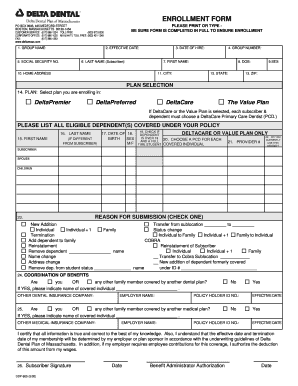
Get Delta Dental Enrollment
How it works
-

Open form follow the instructions
-

Easily sign the form with your finger
-

Send filled & signed form or save
How to fill out the Delta Dental Enrollment online
Filling out the Delta Dental Enrollment form online is a straightforward process that can help you secure your dental coverage efficiently. This guide will walk you through each section of the form, ensuring that all required information is completed thoroughly.
Follow the steps to complete your enrollment successfully.
- Click ‘Get Form’ button to obtain the form and open it in the editor.
- Fill in the group name at the top of the form where indicated. This is the name of your employer's dental plan or group to which you are applying for enrollment.
- Next, provide the effective date of your coverage. This should be the date on which you would like your dental plan to begin.
- Enter your social security number in the appropriate field. This is necessary for identification purposes.
- Input your date of hire. This will help verify your employment status with your employer.
- Fill in your last name and first name in the designated fields. Ensure that these names match the identification you have provided.
- Provide your home address, including street, city, state, and ZIP code. Accurate contact information is crucial.
- Indicate your date of birth and sex in the respective fields. This information is important for enrollment and record-keeping.
- Select your plan from the options provided: DeltaPremier, DeltaPreferred, DeltaCare, or The Value Plan. If you select DeltaCare or The Value Plan, be sure to choose a Primary Care Dentist for each covered individual.
- List all eligible dependents you wish to include under your policy. Be sure to fill in their first and last names, date of birth, and sex. If a dependent will be choosing a Primary Care Dentist, ensure you check the appropriate box.
- Mark the reason for submission by checking the appropriate option. This may include new addition, transfer, termination, or COBRA.
- Complete the coordination of benefits section if applicable. Indicate if you or any family member is covered by another dental or medical plan, and provide the name of the other insurance company.
- Read the certification statement to ensure you understand the implications of the information provided. After reviewing, sign and date the form as the subscriber.
- Finally, if required, have the benefit administrator authorize the document by adding their signature and date. Once everything is filled out correctly, you may save your changes, download, print, or share the completed form as needed.
Take the next step towards your dental coverage and complete your Delta Dental Enrollment online today.
Dental Plan Information 2020 | HealthCare.gov. 2021 Open Enrollment is over, but you may still be able to enroll in 2021 health insurance through a Special Enrollment Period.