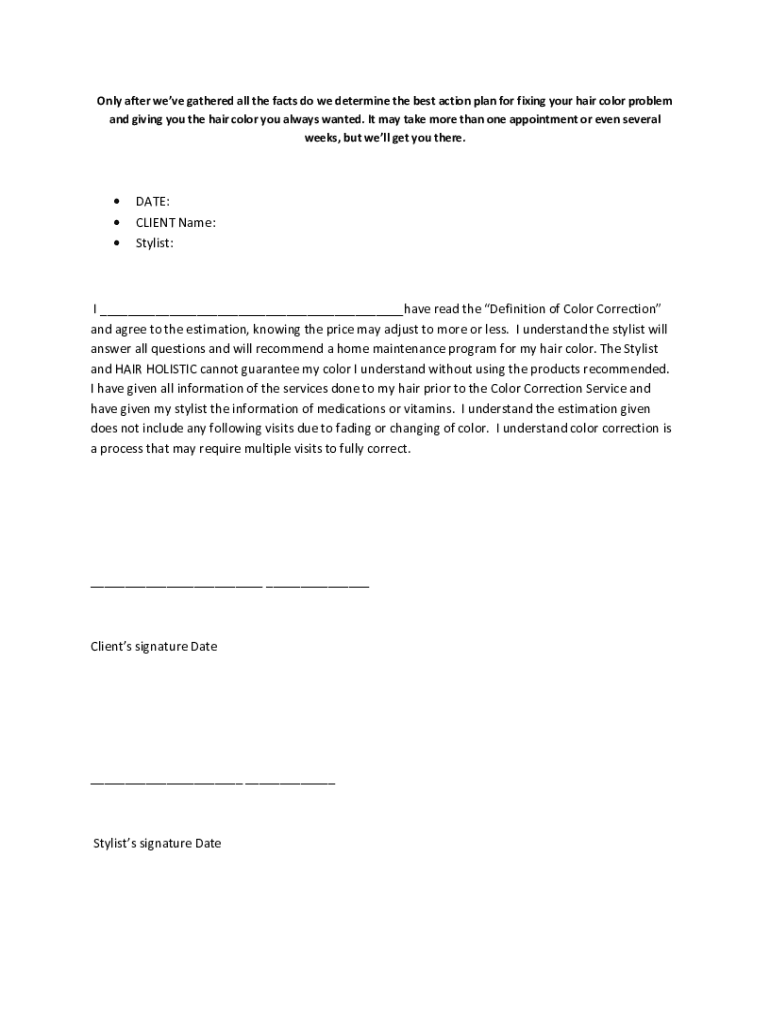
Ce for corrective color. The cost is determined by the amount of work necessary to achieve the desired result. Therefore, no refunds will be given after one salon visit if additional visits are needed to achieve the final desired result for corrective color. Only after we’ve gathered all the facts do we determine the best action plan for fixing your hair color problem and giving you the hair color you always wanted. It may take more than one appointment or even several weeks, but we’ll get.
Loading

Open form follow the instructions

Easily sign the form with your finger

Send filled & signed form or save
How to fill out the Color Correction Client Consent Form online
Completing the Color Correction Client Consent Form online is an important step towards achieving your desired hair color. This guide will provide you with clear, step-by-step instructions to ensure you fill out the form accurately and effectively.
Follow the steps to complete your consent form with ease.
- Click 'Get Form' button to obtain the form and open it in the editor.
- Enter the date in the designated field. This helps track when the consent was given.
- Provide your full name in the 'Client Name' section. Ensure that your name matches the records you have with the salon.
- In the 'Stylist' field, write the name of your assigned stylist for the corrective color service. This ensures clarity regarding who will be performing the service.
- Read the 'Definition of Color Correction' section thoroughly. After understanding the information provided, affirm your comprehension by writing your name in the blank space indicated.
- Sign and date the form in the designated space labeled 'Client’s signature' and 'Date'.
- Wait for your stylist to sign and date the form in the respective area labeled 'Stylist’s signature' and 'Date'.
- Review all entered information for accuracy before finalizing. Once confirmed, save the changes, and you can choose to download, print, or share the completed form.
Complete the Color Correction Client Consent Form online to start your journey towards beautiful hair!
Experience a faster way to fill out and sign forms on the web. Access the most extensive library of templates available.
Related content
Jun 1, 2024 — This form may be used to collect the required client information as stated...
Jun 25, 2025 — It allows practitioners to explain how red light therapy works, its...
Ensure that the Ink Cartridge is the correct color for that slot. Ensure that the Ink...
Get answers to your most pressing questions about US Legal Forms API.
What is a color correction consultation?
A color correction consultation is a meeting between the stylist and the client to discuss the client's hair history, desired outcomes, and the color correction process. During this consultation, the stylist will evaluate the hair's condition and recommend a tailored plan. Including a Color Correction Client Consent Form during this step reinforces the importance of informed decision-making.
What is the purpose of a client consent form?
The purpose of a client consent form is to ensure that clients are well-informed about the services being provided and any possible risks involved. This builds trust between the client and the salon while also protecting the stylist legally. A clearly outlined Color Correction Client Consent Form is vital for a successful salon experience.
Who needs a color correction?
Anyone who has experienced a hair color mishap or wants to change their color dramatically may need a color correction. This service is particularly beneficial for clients with undesired tones from previous coloring or those seeking to achieve a specific look that requires an adjustment. Using a Color Correction Client Consent Form can help clients understand the complexities involved in correcting their hair color.
What is a client consent form?
A client consent form is a legal document that provides detailed information about a service and secures the client's approval to proceed. It typically covers aspects such as the nature of the service, potential risks, and the client's rights. A well-crafted Color Correction Client Consent Form is essential for effective communication and client protection.
What is an example of a client consent?
An example of a client consent is a document that outlines the specific procedures involved in a color correction treatment. This would typically include the risks, potential outcomes, and costs associated with the service. By signing a Color Correction Client Consent Form, clients acknowledge their understanding and acceptance of the treatment plan.
How does a salon do a color correction?
A salon performs color correction by first assessing the client's hair condition and previous color treatments. The stylist will then devise a personalized plan that may include multiple steps to achieve the desired color safely and effectively. Utilizing a Color Correction Client Consent Form ensures that clients are fully informed and agree to the process and expected results.
What is the purpose of a consent form?
The purpose of a consent form is to outline the specific services you will receive and ensure that you understand the process involved. It protects both the client and the salon by providing clear expectations and information about potential outcomes. A Color Correction Client Consent Form is essential for establishing trust and transparency before any service begins.
How long does a color correction take?
The length of time for color correction can vary significantly, often taking anywhere from 2 to 6 hours depending on hair type and desired outcome. During the process, the stylist will apply various treatments, which can extend the time needed. It is beneficial to discuss the timeline and process with your stylist and agree to it via a Color Correction Client Consent Form.
How to ask for hair color at a salon?
To ask for hair color at a salon, be clear about what you want by bringing reference photos. Communicate your previous hair color experiences and desired outcome to your stylist. Discussing the details upfront allows you to complete a Color Correction Client Consent Form effectively, ensuring mutual understanding of the desired result.
Can a salon fix bad hair color?
Yes, a salon can fix bad hair color, but it requires skill and the right techniques. Professional stylists assess the situation and create a strategic plan to restore or change the color. A Color Correction Client Consent Form is often used to clarify client expectations and the methods that will be employed.
Use professional pre-built templates to fill in and sign documents online faster. Get access to thousands of forms.
If you believe that this page should be taken down, please follow our DMCA take down process here.