Loading
Get Banyule Bpi
How it works
-

Open form follow the instructions
-

Easily sign the form with your finger
-

Send filled & signed form or save
How to fill out the Banyule Bpi online
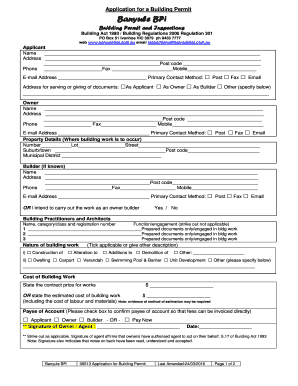
Filling out the Banyule Bpi, or Building Permit application, online is an important step in ensuring that your building projects are compliant with local regulations. This guide provides a clear and structured approach to completing the form accurately.
Follow the steps to successfully complete the Banyule Bpi form.
- Click ‘Get Form’ button to obtain the form and open it in the editor.
- Begin by entering the applicant's name in the designated field. Next, provide the full address, including the post code. Ensure to also include the phone number, fax number, and mobile number for contact purposes.
- Indicate your preferred method of communication by checking the appropriate box: Post, Fax, or Email. Specify if you are applying as the Owner, Builder, or another specified party.
- Provide the address for serving or giving documents, which can be the same as the applicant's address.
- Repeat the process for the owner’s information, filling in their name, address, and contact details systematically.
- Next, enter the property details where the building work will occur. Fill in the number, lot, street, suburb/town, post code, and municipal district accurately.
- If known, provide the builder's details, including name, address, and contact information. Alternatively, indicate if the work will be carried out as an owner-builder.
- List the building practitioners or architects involved. Include their name, category/class, registration number, and indicate their function by marking 'prepared documents only' or 'engaged in building work' where applicable.
- Describe the nature of building work by checking the relevant boxes. This may include construction, alterations, additions, demolition, or other specific descriptions.
- State the contract price for works or provide the estimated cost of building work, ensuring to include all expenses related to labor and materials.
- Indicate the payee for the account by checking the appropriate box - Applicant, Owner, or Builder.
- Sign and date the form where indicated. This signature affirms that you have read, understood, and accepted the terms outlined in the document.
- Finally, save your changes, and opt to download, print, or share the completed form as necessary.
Start filling out your Banyule Bpi application online today!
email us at enquiries@banyule.vic.gov.au.
Industry-leading security and compliance
US Legal Forms protects your data by complying with industry-specific security standards.
-
In businnes since 199725+ years providing professional legal documents.
-
Accredited businessGuarantees that a business meets BBB accreditation standards in the US and Canada.
-
Secured by BraintreeValidated Level 1 PCI DSS compliant payment gateway that accepts most major credit and debit card brands from across the globe.