Loading
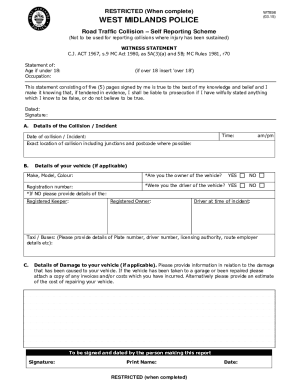
Get Print Your Self Reporting Form Here - West Midlands Police - West-midlands Police
How it works
-

Open form follow the instructions
-

Easily sign the form with your finger
-

Send filled & signed form or save
How to fill out the Print Your Self Reporting Form Here - West Midlands Police online
This guide provides clear instructions for users on how to effectively complete the Print Your Self Reporting Form Here for the West Midlands Police. The following steps will help ensure all required information is accurately filled out.
Follow the steps to successfully complete the reporting form.
- Click ‘Get Form’ button to obtain the form and open it in your document editor.
- Begin by entering your personal details. This includes your surname, first name, and title, along with your date of birth and address.
- Provide your contact information, including telephone numbers (home and mobile) and email address. Make sure to select your preferred method of contact.
- Detail your driving and vehicle documents. Include your driving licence number, type of licence (full or provisional), insurance details, and MOT certificate number with expiry date.
- Fill out the section regarding the collision. Start with the time and date of the incident, along with the exact location, ensuring to include junctions and postcodes if possible.
- Describe your vehicle details, including make, model, colour, registration number, and your ownership status. Indicate whether you were the driver.
- Provide information on damage to your vehicle and any other parties’ property if applicable. Include any estimates or costs involved.
- If the collision involved other vehicles, fill in their make, model, colour, and registration numbers, as well as details about any damage.
- In the next section, describe the conditions at the time of the incident, such as traffic and weather conditions.
- Provide a detailed account of the incident. Include all relevant details, such as the direction of travel for all vehicles involved.
- Sign and date the form at relevant sections, and ensure you have signed all pages as required.
- Once you have completed all sections of the form, make sure to save your changes and either download, print, or share the completed document as needed.
Complete your reporting form online today to ensure your details are recorded accurately.
Calling from abroad +44 20 7230 1212 Please use this number if you're contacting us from outside of the UK.
Industry-leading security and compliance
US Legal Forms protects your data by complying with industry-specific security standards.
-
In businnes since 199725+ years providing professional legal documents.
-
Accredited businessGuarantees that a business meets BBB accreditation standards in the US and Canada.
-
Secured by BraintreeValidated Level 1 PCI DSS compliant payment gateway that accepts most major credit and debit card brands from across the globe.