Loading
Get Tnai Full Form
How it works
-

Open form follow the instructions
-

Easily sign the form with your finger
-

Send filled & signed form or save
How to fill out the Tnai Full Form online
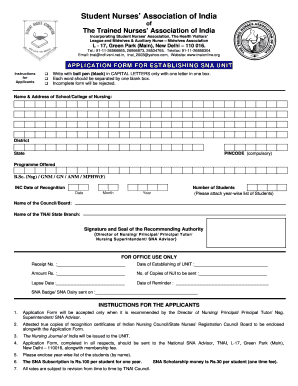
Completing the Tnai Full Form online is a crucial step for establishing a Student Nurses’ Association unit. This guide will provide you with a comprehensive, step-by-step process to ensure that your application is filled out accurately and effectively.
Follow the steps to fill out the Tnai Full Form with ease.
- Click ‘Get Form’ button to obtain the form and open it in your preferred document editing program.
- Begin by filling in the name and address of your school or college of nursing, ensuring you use capital letters and write clearly in the designated boxes.
- Fill in the district, state, and required pincode. The pincode is compulsory and must be completed accurately.
- Indicate the programme offered, selecting from B.Sc. (Nsg), GNM, GN, ANM, or MPHW(F) as applicable.
- Provide the INC date of recognition by entering the date, month, and year in the specified fields.
- Input the number of students in your unit. Remember to attach a year-wise list of students separately.
- Write the name of the council or board associated with your program.
- Specify the name of the TNAI state branch you are associated with.
- Have the form signed and sealed by the recommending authority which can be the Director of Nursing, Principal, Principal Tutor, Nursing Superintendent, or SNA Advisor.
- Once all fields are completed, review your application to ensure all information is correct and that the form is fully filled out.
- Save your changes, and you may choose to download or print the form for submission. Ensure you follow any submission guidelines provided.
Complete your documents online today to ensure your SNA unit is established smoothly.
Anita Deodhar, President, TNAI: Voice of Indian Nurses.
Industry-leading security and compliance
US Legal Forms protects your data by complying with industry-specific security standards.
-
In businnes since 199725+ years providing professional legal documents.
-
Accredited businessGuarantees that a business meets BBB accreditation standards in the US and Canada.
-
Secured by BraintreeValidated Level 1 PCI DSS compliant payment gateway that accepts most major credit and debit card brands from across the globe.