Loading
Get Infospibs
How it works
-

Open form follow the instructions
-

Easily sign the form with your finger
-

Send filled & signed form or save
How to fill out the Infospibs online
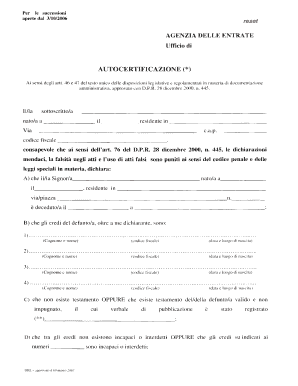
Filling out the Infospibs document online is an essential step in managing inheritance matters. This guide aims to provide clear instructions on how to successfully complete each section of the form, ensuring compliance and accuracy.
Follow the steps to complete the Infospibs form online.
- Click ‘Get Form’ button to obtain the form and open it in the online editor.
- Begin by filling in the following personal details: Your full name, date of birth, and address, including street, postal code, and tax code.
- Provide information about the deceased person, including their name, date of birth, and address at the time of death. Specify the date of death.
- List the heirs of the deceased. For each heir, include their full name, date of birth, and tax code.
- Indicate whether a valid will exists. If it does, provide the registration details of the will.
- State whether any of the heirs are incapacitated or otherwise unable to inherit.
- Confirm whether any heirs have renounced their inheritance and provide details if applicable.
- For tax purposes, state where the inheritance was reported and include the corresponding reference number.
- Acknowledge the marital status of the deceased in relation to the surviving spouse, particularly regarding any legal separations.
- If necessary, specify if a notarized proxy has been established for the collection of the inheritance.
- Finally, review all entered information for accuracy, and then save your changes, download, print, or share the form as needed.
Complete your Infospibs document online today for a seamless inheritance process.