Loading
Get Patient Assistance Program -
How it works
-

Open form follow the instructions
-

Easily sign the form with your finger
-

Send filled & signed form or save
How to fill out the Patient Assistance Program online
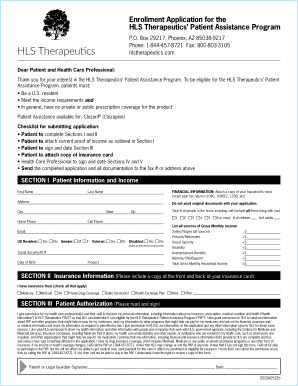
Filling out the Patient Assistance Program form online can help you access critical medications at no cost. This guide provides clear and instructive steps to ensure that you complete the application accurately and effectively.
Follow the steps to successfully complete your application.
- Click ‘Get Form’ button to obtain the form and open it in your editor.
- Complete Section I by providing your patient information, including your first name, last name, address, contact numbers, and total number of people living in your household.
- In Section I, carefully list all sources of your gross monthly income, including salary, Social Security, and any benefits. Attach proof of income such as recent tax returns.
- Fill out Section II regarding your insurance information, ensuring to select all applicable options and attach copies of your insurance card.
- Move to Section III and read the patient authorization carefully before signing and dating it. This section gives permission for HLS Therapeutics to access necessary health information.
- Ensure that all required documentation is attached, including proof of income and insurance details.
- Have your health care professional complete Sections IV and V, which includes their information and signature confirming your enrollment.
- Once everything is complete, send the application and all documentation to the designated fax number or physical address provided.
- Finally, save changes, download, or print the application for your records.
Begin your application process and complete the Patient Assistance Program form online today.
Related links form
Ensuring The Future Of The American Eel In Atlantic ... - Species At Risk
Cloud Computing Security Zones& Domains Implementation Guidelines Form
Declaration Of Conjugal Relationship Form - York University - Yorku
IMPORTANT Read The User Guide And Questions And Answers Before Completing This Application Form
With the Savings Card, you may pay as little as $4 for each 30-day fill of brand-name . Eligible patients could save up to $1,800 a year. Savings Card only works on brand-name . Terms and Conditions apply.