Loading
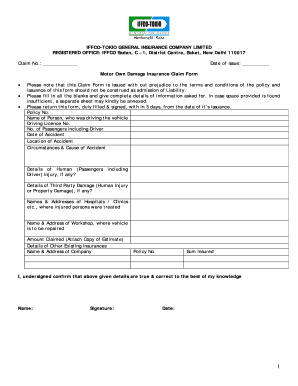
Get Iffco Tokio Insurance Claim Form
How it works
-

Open form follow the instructions
-

Easily sign the form with your finger
-

Send filled & signed form or save
How to fill out the Iffco Tokio Insurance Claim Form online
Filling out the Iffco Tokio Insurance Claim Form online can be a straightforward process if you follow the right steps. This guide will walk you through each section of the form to ensure that you provide all necessary information accurately.
Follow the steps to complete the form successfully.
- Click the ‘Get Form’ button to access the form and open it in your preferred editor.
- In the first section, enter the claim number that has been assigned to you, as well as the date of issue for your claim form. This information is crucial for tracking your claim.
- Fill in your policy number accurately. Ensure that the number reflects your current insurance policy with Iffco Tokio.
- Provide the full name of the person who was driving the vehicle at the time of the accident. This is important for verifying driver details.
- Enter the driving license number of the driver. Make sure this number is correct as it will be verified against relevant records.
- Indicate the total number of passengers in the vehicle at the time of the accident, including the driver.
- Specify the date of the accident to provide a clear timeline of events.
- Describe the location where the accident occurred. Include streets, landmarks, or nearby intersections for clarity.
- Detail the circumstances and cause of the accident. This section allows you to explain what happened in your own words.
- If there were any injuries to passengers, provide their details in the respective section. Include descriptions of the injuries sustained.
- Outline any damage to third parties, whether human injury or property damage. Accurate reporting is vital for claims processing.
- List the names and addresses of hospitals or clinics where injured parties received treatment. This information supports your claim.
- Identify the workshop where your vehicle is to be repaired, including the name and address.
- State the amount claimed, attaching a copy of the estimate for repairs. Include all relevant financial documents to expedite your claim.
- Disclose any other existing insurances that may relate to the claim, including the policy number and the name of the insurance company.
- Finally, confirm that the details provided are correct by signing and dating the form.
- After completing the form, ensure that all changes are saved. You can then download, print, or share the form as needed.
Complete your insurance claim documents online for a smoother claims process.
Related links form
An insurance claim is a request to the insurance company for payment after a policyholder experiences a loss covered by their policy. For example, if a home is damaged by a fire and the homeowner has insurance, they will file a claim to begin the process of the insurance company paying for the repairs.