Loading
Form preview
  • US Legal Forms
  • Form Library
  • More Forms
  • More Uncategorized Forms
  • New Customer Master Information Data Sheet

Get New Customer Master Information Data Sheet

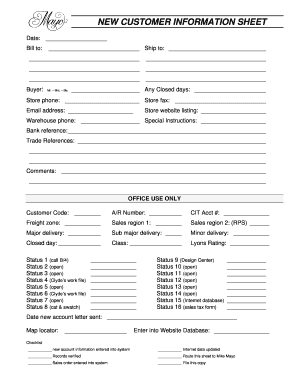
Title: Microsoft Word NEW CUSTOMER MASTER INFORMATION DATA SHEET.doc Author: Don McCoy Created Date: 8/30/2010 9:09:20 AM.

How it works

  1. Open form

    Open form follow the instructions

  2. Easily sign form

    Easily sign the form with your finger

  3. Share form

    Send filled & signed form or save

How to fill out the NEW CUSTOMER MASTER INFORMATION DATA SHEET online

Filling out the NEW CUSTOMER MASTER INFORMATION DATA SHEET online ensures that your information is collected accurately and efficiently. This guide walks you through each section of the form to help you complete it with confidence.

Follow the steps to fill out the form accurately:

  1. Press the ‘Get Form’ button to access the document and open it in your preferred online editor.
  2. Begin with the date section, entering the correct date on which you are filling out the form.
  3. In the ‘Bill to’ section, input the billing address. Make sure to include all relevant details such as street address, city, state, and zip code.
  4. Proceed to the ‘Ship to’ section and provide the shipping address if it differs from the billing address.
  5. In the ‘Buyer’ field, select the appropriate title (Mr., Mrs., or Ms.) and enter the buyer's name accordingly.
  6. Input any closed days that may affect order processing in the designated space.
  7. Complete the ‘Store phone’ and ‘Store fax’ sections with the correct contact details.
  8. Enter the relevant email address for communication.
  9. If applicable, list the store's website for online presence.
  10. In the ‘Warehouse phone’ section, provide the contact number for warehouse inquiries.
  11. Add any special instructions that may be necessary for processing the account.
  12. Provide a bank reference to facilitate credit checks or transactions.
  13. List trade references to establish credibility and support your application.
  14. Use the comments section for any additional information or notes that may assist in processing.
  15. Complete any office use sections, including customer code and account numbers if required.
  16. After filling in all necessary fields, ensure all details are accurate. Save your changes, and choose to download, print, or share the completed form as needed.

Complete your documents online today for seamless customer registration.

Get form

Experience a faster way to fill out and sign forms on the web. Access the most extensive library of templates available.
Get form

Related content

Key Recommendation Customer Masters will use SAP...
Aug 9, 2008 — Which could result in the need for a form, report, interface, ... Identify...
Learn more
List of SAP Transactions
11, OV51, Display of Changes for Customer, Customer Information ... 59, FM6S, FIFM:...
Learn more
Data Sheet
This document contains certain information on a new product. ... MC68HC05C9A Advance...
Learn more

Related links form

D120 Customs Bond Form 76b Form 721 - Ministry Of Finance - Fin Gov Bc Fair PharmaCare Plan Registration Form - Kwantlen Polytechnic ...

Questions & Answers

Get answers to your most pressing questions about US Legal Forms API.

Contact support

Customer master data is the data you require to conduct business relationships with your customers. It includes address data and terms of payment, for example. It also controls how business transactions are posted to a customer account and how the posted data is processed.

Displaying Customer Master Record Changes: - Step-1: From SAP easy access menu, go to Accounting → Finance Accounting → Accounts Receivable → Master Records → FD04 – Display Changes . Enter the transaction code FD04 in the SAP command field and click Enter to continue.

Customer master data is the data you require to conduct business relationships with your customers. It includes address data and terms of payment, for example. It also controls how business transactions are posted to a customer account and how the posted data is processed.

To create the customer centrally, use transaction code XD01. You can create a customer referencing a prior customer by enter information in the Reference box. In standard configuration, the customer number will be internally assigned by the system after completion of the customer master creation.

Create Customer Master Data: SAP XD01 Background. Step 1 – Enter T-Code XD01 in Command field. Step 2 – Enter the detail in Address Tab screen as below- Step 3 – Enter Data in Control Data Tab Screen Field. Step 4 – Enter Data on Payment Transactions tab. Step 5 – Enter sales area data- Step 6 – Save the record.

Procedure Select transaction se38. Choose the extraction program RS_BCT_DB_CREATE_TAB_AND_FILE and execute the program. Enter the name of the database table to which the master data will be downloaded. ... Enter the name of the BW Export file.

How to create a customer master data centrally in SAP FI? Use the T-code FD01 or go to Accounting → Finance Accounting → Accounts Receivable → Master Records → Maintain Centrally → Create.

Enter transaction code “FD03” in SAP command field or follow the menu path: Accounting –> Financial Accounting –> Accounts Receivable –> Master Records –>Display. Customer Display Initial screen, Update the customer account number and company code, then press enter to continue.

Get This Form Now!

Use professional pre-built templates to fill in and sign documents online faster. Get access to thousands of forms.
Get form
If you believe that this page should be taken down, please follow our DMCA take down processhere.

Industry-leading security and compliance

US Legal Forms protects your data by complying with industry-specific security standards.
  • In businnes since 1997
    25+ years providing professional legal documents.
  • Accredited business
    Guarantees that a business meets BBB accreditation standards in the US and Canada.
  • Secured by Braintree
    Validated Level 1 PCI DSS compliant payment gateway that accepts most major credit and debit card brands from across the globe.
Get NEW CUSTOMER MASTER INFORMATION DATA SHEET
Get form
  • Adoption
  • Bankruptcy
  • Contractors
  • Divorce
  • Home Sales
  • Employment
  • Identity Theft
  • Incorporation
  • Landlord Tenant
  • Living Trust
  • Name Change
  • Personal Planning
  • Small Business
  • Wills & Estates
  • Packages A-Z
  • Affidavits
  • Bankruptcy
  • Bill of Sale
  • Corporate - LLC
  • Divorce
  • Employment
  • Identity Theft
  • Internet Technology
  • Landlord Tenant
  • Living Wills
  • Name Change
  • Power of Attorney
  • Real Estate
  • Small Estates
  • Wills
  • All Forms
  • Forms A-Z
  • Form Library
  • Legal Hub
  • About Us
  • Help Portal
  • Legal Resources
  • Blog
  • Affiliates
  • Contact Us
  • Delete My Account
  • Site Map
  • Industries
  • Forms in Spanish
  • Localized Forms
  • State-specific Forms
  • Forms Kit
  • Real Estate Handbook
  • All Guides
  • Notarize
  • Incorporation services
  • For Consumers
  • For Small Business
  • For Attorneys
  • USLegal
  • FormsPass
  • pdfFiller
  • signNow
  • altaFlow
  • DocHub
  • Instapage
Form Packages
  • Adoption
  • Bankruptcy
  • Contractors
  • Divorce
  • Home Sales
  • Employment
  • Identity Theft
  • Incorporation
  • Landlord Tenant
  • Living Trust
  • Name Change
  • Personal Planning
  • Small Business
  • Wills & Estates
  • Packages A-Z
Form Categories
  • Affidavits
  • Bankruptcy
  • Bill of Sale
  • Corporate - LLC
  • Divorce
  • Employment
  • Identity Theft
  • Internet Technology
  • Landlord Tenant
  • Living Wills
  • Name Change
  • Power of Attorney
  • Real Estate
  • Small Estates
  • Wills
  • All Forms
  • Forms A-Z
  • Form Library
Customer Service
  • Legal Hub
  • About Us
  • Help Portal
  • Legal Resources
  • Blog
  • Affiliates
  • Contact Us
  • Delete My Account
  • Site Map
  • Industries
  • Forms in Spanish
  • Localized Forms
  • State-specific Forms
  • Forms Kit
Legal Guides
  • Real Estate Handbook
  • All Guides
Prepared for you
  • Notarize
  • Incorporation services
Our Customers
  • For Consumers
  • For Small Business
  • For Attorneys
Our Sites
  • USLegal
  • FormsPass
  • pdfFiller
  • signNow
  • altaFlow
  • DocHub
  • Instapage
Social Media
Call us now toll free:
+1 833 426 79 33
As seen in:
© Copyright 1999-2026 airSlate Legal Forms, Inc. 3720 Flowood Dr, Flowood, Mississippi 39232
  • Your Privacy Choices
  • Terms of Service
  • Privacy Notice
  • Content Takedown Policy
  • Bug Bounty Program