Loading
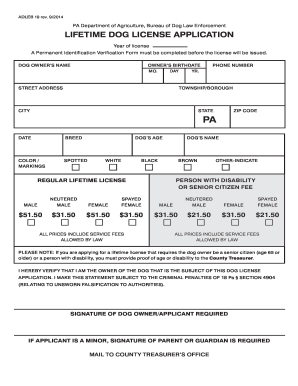
Get Pa Adleb 19 2014-2026
How it works
-

Open form follow the instructions
-

Easily sign the form with your finger
-

Send filled & signed form or save
How to fill out the PA ADLEB 19 online
This guide provides step-by-step instructions for completing the PA ADLEB 19 form, which is the lifetime dog license application. By following these instructions, users can efficiently navigate the online process to secure a license for their pet.
Follow the steps to complete your lifetime dog license application
- Click ‘Get Form’ button to access the PA ADLEB 19 form and open it in your online editor.
- Fill in the dog's owner's name in the designated field to ensure proper identification.
- Input the date when you are filling out the application.
- Specify the dog's age and provide the dog's name.
- Select the appropriate boxes to confirm if the dog is neutered or spayed, and indicate the dog’s sex (male or female).
- Sign the application to verify you are the owner of the dog and acknowledge the penalties for false statements.
- After completing the form, you can save changes, download, print, or share the document as needed.
Complete your PA ADLEB 19 application online today and ensure a lifetime of care for your dog.
To obtain a lifetime dog license in Pennsylvania, you must meet certain criteria as outlined in PA ADLEB 19. These requirements typically include proof of rabies vaccination and payment of the applicable fees. A lifetime license simplifies the registration process and provides long-term benefits for your pet.