Loading
Get Bnsf Logistics Quick Pay
How it works
-

Open form follow the instructions
-

Easily sign the form with your finger
-

Send filled & signed form or save
How to fill out the Bnsf Logistics Quick Pay online
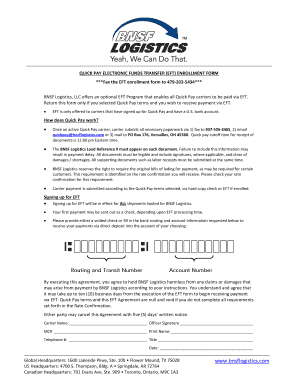
Completing the Bnsf Logistics Quick Pay online form is a straightforward process designed for carriers who wish to expedite their payment through electronic funds transfer. This guide will provide you with clear instructions to ensure accurate completion of the form.
Follow the steps to successfully complete the Quick Pay online form.
- Press the ‘Get Form’ button to obtain the Quick Pay enrollment form and open it in your preferred document editor.
- Fill out the carrier name section by entering the official business name of the carrier applying for Quick Pay. This ensures Bnsf Logistics can identify your company correctly.
- Provide the MC# (Motor Carrier number) to verify your registration as a legitimate carrier. This number is crucial for processing your Quick Pay application.
- Complete the officer signature section by having an authorized representative of your company sign the form. This affirms the accuracy of the information provided.
- Print the name of the signing officer in the designated area to clarify the identity of the individual who has authorized the form.
- Enter the telephone number where the signing officer can be contacted for any follow-up or clarification. This assists in the communication with Bnsf Logistics.
- Indicate the title of the signing officer; this adds an extra layer of identification regarding who is representing the carrier.
- Fill in the date of signing to establish when the Quick Pay enrollment form was completed.
- Attach a voided check or provide your bank routing and account number in the spaces provided. This is essential for setting up the electronic funds transfer for payment.
- Review all entries for accuracy and completeness to avoid processing delays. Ensure that all required signatures are affixed and that no sections are left blank.
- Save your changes, then download or print the completed form. Ensure you keep a copy for your records before submission.
- Submit the completed form by faxing it to 479-203-5434 or following the other submission methods provided in the instructions.
Get started with your Quick Pay enrollment today by filling out the form online!
The merger of the two on Sept. 22, 1995, created Burlington Northern and Santa Fe Railway, the largest rail network in North America at the time. BNSF Railway's 384-acre headquarters is located in Fort Worth, Texas.
Industry-leading security and compliance
US Legal Forms protects your data by complying with industry-specific security standards.
-
In businnes since 199725+ years providing professional legal documents.
-
Accredited businessGuarantees that a business meets BBB accreditation standards in the US and Canada.
-
Secured by BraintreeValidated Level 1 PCI DSS compliant payment gateway that accepts most major credit and debit card brands from across the globe.