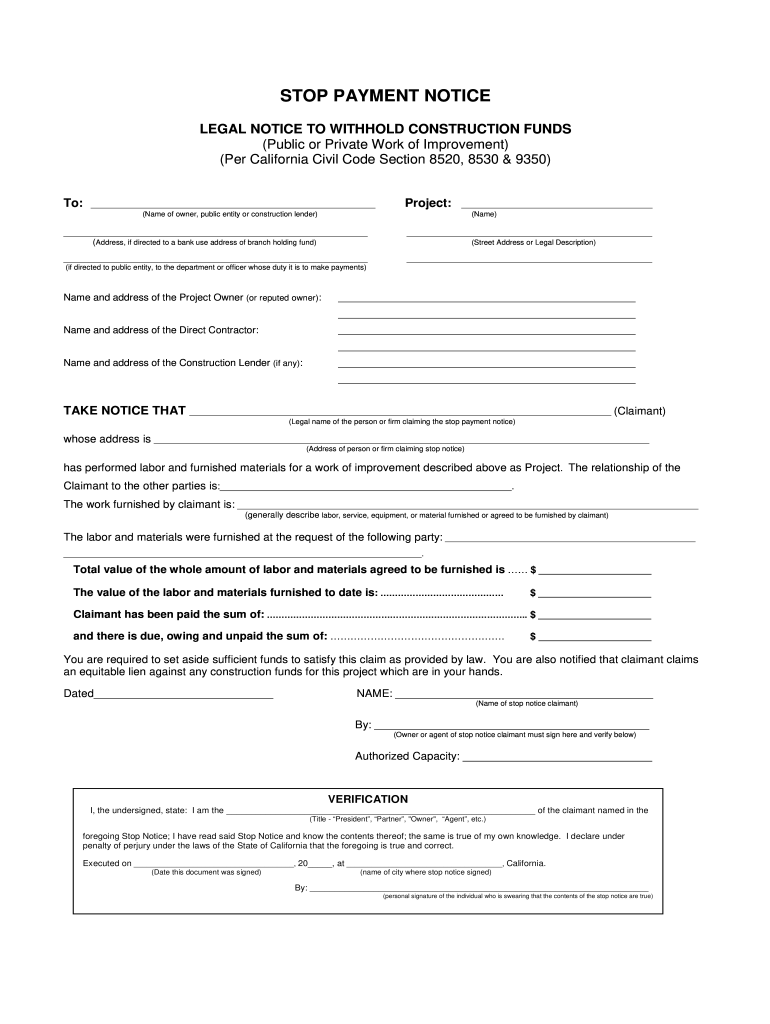
By: _________________________________________________ (Owner or agent of stop notice claimant must sign here and verify below) Authorized Capacity: ______________________________ VERIFICATION I, the undersigned, state: I am the _______________________________________________________________ of the claimant named in the (Title - “President”, “Partner”, "Owner", “Agent”, etc.) foregoing Stop Notice; I have read said Stop Notice and know the contents thereof; the same is true of my .
Loading

Open form follow the instructions

Easily sign the form with your finger

Send filled & signed form or save
How to fill out the CA Stop Payment Notice without construction funds online
Navigating the CA Stop Payment Notice can be challenging for those unfamiliar with legal documents. This guide aims to provide clear, step-by-step instructions for completing the form online, ensuring you have the necessary tools and information to submit your notice effectively.
Follow the steps to fill out the CA Stop Payment Notice online.
- Press the ‘Get Form’ button to access the CA Stop Payment Notice and open it in your preferred form editor.
- Provide the name of the owner, public entity, or construction lender at the top of the form, ensuring that the project information is accurate.
- Fill in the address of the entity to whom the notice is directed. If directed to a bank, include the branch address holding the funds.
- Clearly state the project name and provide a legal description or street address related to the work of improvement.
- Identify the project owner by listing their name and address.
- Include the name and address of the direct contractor responsible for the project.
- If applicable, enter the name and address of the construction lender.
- Input the claimant's legal name, which refers to the individual or firm claiming the stop payment notice, followed by their address.
- Describe the relationship of the claimant to the parties involved in the project with clear and concise terms.
- In the designated section, summarize the labor, service, equipment, or materials provided by the claimant for the project.
- Record the total value of the labor and materials agreed to be furnished, along with the value of those provided to date.
- Indicate the amount that has been paid to the claimant, ensuring it is accurate to avoid disputes.
- Note the sum that is still due and unpaid, which is critical for purposes of setting aside sufficient funds.
- Date the document and include the name of the claimant, ensuring that the designated individual signs the form.
- Verify the statement by including the title of the individual signing and confirming the contents under penalty of perjury.
- If necessary, fill out the request for notice of election section to ensure you receive any relevant updates.
- Complete the proof of notice declaration by stating the method used to serve the notice and the details of the recipient.
- Check the appropriate box regarding the method of delivery used and ensure the signature of the person making the service is included.
- Lastly, review all entries for accuracy, then save changes, download, print, or share the completed form as needed.
Complete and submit your CA Stop Payment Notice online today to secure your interests.
Experience a faster way to fill out and sign forms on the web. Access the most extensive library of templates available.
Related content
Listed below are steps that can be taken after a Stop Notice is filed: The prime...
by DK Ilyin · 1964 · Cited by 12 — Disbursement of the entire loan fund to the...
Jul 12, 2019 — This manual was written to outline a systematic construction management...
Get answers to your most pressing questions about US Legal Forms API.
What is a stop payment notice in construction?
A stop payment notice in construction is a notification directed at a property owner or general contractor to prevent payment until a payment dispute is resolved. This legal notice is essential for those who may not have received compensation for work performed or materials supplied in a project. Implementing a CA Stop Payment Notice without construction funds allows those affected to assert their rights effectively.
How to write a stop notice?
To write a stop notice, begin by clearly identifying yourself and the involved parties, such as the property owner and contractors. Include a detailed account of the work done, the payment due, and any relevant dates. It is crucial to maintain clarity and formality in your wording, especially when you're addressing a CA Stop Payment Notice without construction funds to ensure it holds up legally.
What is a stop payment notice?
A stop payment notice is a legal document that notifies a payer to withhold payment due to unresolved financial obligations. This notice can be critical for individuals who have not received payments for services rendered or materials provided. By issuing a CA Stop Payment Notice without construction funds, claimants protect their rights and seek relevant compensation.
Who files a stop notice?
Typically, subcontractors, suppliers, and other entities involved in a construction project file a stop notice to secure payment for their contributions. These parties utilize this tool to ensure that payment is withheld until their demands are met. For those facing challenges regarding compensation, filing a CA Stop Payment Notice without construction funds can be an effective strategy.
How does a stop work notice work?
A stop work notice is issued to halt construction activities temporarily, usually due to payment disputes or project-related concerns. Once a stop work notice is served, the contractor must immediately cease all operations until the issue is resolved. This procedure is essential for protecting rights and interests when navigating a CA Stop Payment Notice without construction funds.
What information must be included in a stop payment notice?
A stop payment notice must include essential details such as the name and address of the claimant, the property involved, and a clear description of the services or materials provided. Additionally, you should specify the amount owed and include dates relevant to the work performed. Providing comprehensive information reinforces your position when issuing a CA Stop Payment Notice without construction funds.
What is the purpose of a stop notice?
The primary purpose of a stop notice is to prevent the disbursement of funds for a construction project until all financial obligations are met. This legal tool helps ensure that those who supply labor or materials are compensated fairly. In essence, it acts as a safeguard for subcontractors and suppliers, especially useful in cases involving a CA Stop Payment Notice without construction funds.
What does a stop notice do?
A stop notice serves as a formal request that alerts a party, often a property owner or general contractor, to withhold payment on a construction project. This notice provides a means to protect the rights of subcontractors or suppliers when there are disputes regarding payment. When you utilize a CA Stop Payment Notice without construction funds, it ensures that your contribution to the project is recognized and that you receive your rightful payment.
How do I cancel a construction contract in California?
To cancel a construction contract in California, you must follow specific legal steps. Start by reviewing the contract for cancellation clauses and requirements. If you face payment issues or receive a CA Stop Payment Notice without construction funds, it may be necessary to invoke these clauses calmly. Using services like uslegalforms can offer guidance tailored to your situation, making the cancellation process smoother.
What is the Civil Code 3294 in California?
Civil Code 3294 in California deals with punitive damages in cases of fraud, oppression, or malice. While it may not directly relate to stop payment notices, knowing this code can be beneficial in larger contract disputes. If you are dealing with a CA Stop Payment Notice without construction funds, being aware of potential for punitive damages may inform your strategy when addressing substantial breaches.
Use professional pre-built templates to fill in and sign documents online faster. Get access to thousands of forms.
If you believe that this page should be taken down, please follow our DMCA take down process here.