Loading
Form preview
  • US Legal Forms
  • Form Library
  • Other Forms
  • California Other Forms
  • Ca Bof 119 2016

Get Ca Bof 119 2016-2026

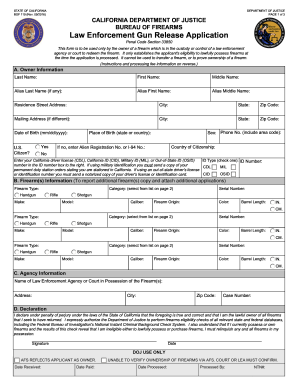
Law Enforcement Gun Release Application Penal Code Section 33850 This form is to be used only by the owner of a firearm which is in the custody or control of a law enforcement agency or court to redeem the firearm. It only establishes the applicant's eligibility to lawfully possess firearms at the time the application is processed. It cannot be used to transfer a firearm, or to prove ownership of a firearm. (Instructions and processing fee information on reverse.) A. Owner Information Last Nam.

How it works

  1. Open form

    Open form follow the instructions

  2. Easily sign form

    Easily sign the form with your finger

  3. Share form

    Send filled & signed form or save

How to fill out the CA BOF 119 online

The CA BOF 119 form, also known as the Law Enforcement Gun Release Application, is designed for individuals seeking to reclaim firearms held by law enforcement. This guide provides a comprehensive overview of how to accurately fill out the form online, ensuring a smooth filing process.

Follow the steps to complete the CA BOF 119 form online.

  1. Press the ‘Get Form’ button to access the CA BOF 119 form and open it in your preferred online editor.
  2. Begin with section A: Owner Information. Fill in your last name, first name, and middle name. If you have any aliases, include those as well. Provide your residence address, mailing address (if different), date of birth, citizenship status, and contact phone number.
  3. In section B: Firearm Information, report details for each firearm you wish to redeem. Select the category (Handgun, Rifle, Shotgun) and fill in the make, model, serial number, caliber, color, and barrel length for each firearm. Ensure to complete this section for every firearm accurately.
  4. Proceed to section C: Agency Information. Enter the name and address of the law enforcement agency or court currently possessing your firearm. Include the case number related to your application.
  5. In section D: Declaration, read the declaration statement carefully. Once you understand and agree, sign and date the declaration to confirm that the information provided is true and accurate.
  6. Review your completed CA BOF 119 form for any errors or missing information. Ensure all required fields are filled out correctly before submitting.
  7. Once satisfied, save your changes, download the completed form, or print it out for submission. Be sure to follow any specific instructions regarding submission fees and where to send the form.

Start completing the CA BOF 119 form online today to reclaim your firearm.

Get form

Experience a faster way to fill out and sign forms on the web. Access the most extensive library of templates available.
Get form

Related content

BOF 119, Law Enforcement Gun Release Application
BOF 119 (Rev. 05/2019). PAGE 1 of 4. CALIFORNIA DEPARTMENT OF JUSTICE. BUREAU OF FIREARMS...
Learn more
CAMP FIRE
The California Watershed Emergency Response Team (WERT) helps communities prepare after...
Learn more
Alcatel-Lucent
Alcatel-Lucent products are intended for commercial uses. Without the appropriate network...
Learn more

Related links form

MT Wholesale Food Review Form 2015 NC ABC-002 2001 NC B-01 2017 NC Building Permit Application Form

Questions & Answers

Get answers to your most pressing questions about US Legal Forms API.

Contact support

The new gun laws in California for 2025 reflect a strong commitment to safety and responsible ownership. One significant aspect is CA BOF 119, which introduces stricter regulations on firearm purchases and ownership. This law aims to enhance background checks and ensure that firearms do not end up in the wrong hands. For individuals looking to navigate these laws, US Legal Forms offers resources and guidance to help you stay compliant and informed.

To file the California corporate disclosure statement online, you can use the CA BOF 119 form available on the California Secretary of State's website. The online system offers a straightforward process to complete your filing accurately. This digital approach makes it easier to stay compliant with state regulations and enhances your business's credibility.

In California, a felon may own a gun after completing their sentence, including parole, if 10 years have passed since their conviction. However, specific conditions apply, and it is advisable to seek legal guidance to understand individual circumstances. Exploring your options through reputable sources can provide clarity on this matter.

In California, corporations are required to file a statement of Information annually. This keeps your business records up-to-date with the state. The CA BOF 119 form is essential for this process, and timely filing helps avoid penalties and maintain good standing for your corporation.

To file a statement of Information for an S Corp in California, you must complete the CA BOF 119 form. You can submit this form online or by mail, depending on your preference. Ensure that you include all required details and updates about your corporation to maintain compliance with state regulations.

Yes, you can file the CA statement of Information online through the California Secretary of State's website. This process is convenient and allows you to submit your information without needing to visit a physical office. Using the CA BOF 119 form simplifies filing, ensuring you meet state requirements quickly and efficiently.

In California, owning an unregistered firearm is generally illegal. The law requires that all firearms be registered to ensure compliance with state regulations. It's crucial to adhere to the legal guidelines established by the state, including obtaining your CA BOF 119 certificate. If you're unsure about your firearm's status, consider consulting legal experts or utilizing resources available on platforms like uslegalforms for clarity.

You can obtain a California firearm safety certificate at various certified training locations, including gun stores and online classes. You can also check with organizations that provide courses for CA BOF 119. They can guide you through the process and ensure you receive the proper training. Always choose a reputable provider to ensure a quality learning experience.

Obtaining a Firearm Safety Certificate (FSC) in California is quite efficient. Many individuals complete the required coursework and pass the test in the same day. Once you pass the exam for CA BOF 119, you will receive certification immediately. This quick turnaround helps aspiring gun owners meet legal requirements without much delay.

In California, you cannot apply for a gun license entirely online due to legal requirements. While you can complete some parts of the process online, such as taking the CA BOF 119 safety classes, you must finalize applications in person at your local licensing authority. It's essential to familiarize yourself with California's laws and complete all required steps to ensure compliance.

Get This Form Now!

Use professional pre-built templates to fill in and sign documents online faster. Get access to thousands of forms.
Get form
If you believe that this page should be taken down, please follow our DMCA take down processhere.

Industry-leading security and compliance

US Legal Forms protects your data by complying with industry-specific security standards.
  • In businnes since 1997
    25+ years providing professional legal documents.
  • Accredited business
    Guarantees that a business meets BBB accreditation standards in the US and Canada.
  • Secured by Braintree
    Validated Level 1 PCI DSS compliant payment gateway that accepts most major credit and debit card brands from across the globe.
Get CA BOF 119
Get form
  • Adoption
  • Bankruptcy
  • Contractors
  • Divorce
  • Home Sales
  • Employment
  • Identity Theft
  • Incorporation
  • Landlord Tenant
  • Living Trust
  • Name Change
  • Personal Planning
  • Small Business
  • Wills & Estates
  • Packages A-Z
  • Affidavits
  • Bankruptcy
  • Bill of Sale
  • Corporate - LLC
  • Divorce
  • Employment
  • Identity Theft
  • Internet Technology
  • Landlord Tenant
  • Living Wills
  • Name Change
  • Power of Attorney
  • Real Estate
  • Small Estates
  • Wills
  • All Forms
  • Forms A-Z
  • Form Library
  • Legal Hub
  • About Us
  • Help Portal
  • Legal Resources
  • Blog
  • Affiliates
  • Contact Us
  • Delete My Account
  • Site Map
  • Industries
  • Forms in Spanish
  • Localized Forms
  • State-specific Forms
  • Forms Kit
  • Real Estate Handbook
  • All Guides
  • Notarize
  • Incorporation services
  • For Consumers
  • For Small Business
  • For Attorneys
  • USLegal
  • FormsPass
  • pdfFiller
  • signNow
  • altaFlow
  • DocHub
  • Instapage
Form Packages
  • Adoption
  • Bankruptcy
  • Contractors
  • Divorce
  • Home Sales
  • Employment
  • Identity Theft
  • Incorporation
  • Landlord Tenant
  • Living Trust
  • Name Change
  • Personal Planning
  • Small Business
  • Wills & Estates
  • Packages A-Z
Form Categories
  • Affidavits
  • Bankruptcy
  • Bill of Sale
  • Corporate - LLC
  • Divorce
  • Employment
  • Identity Theft
  • Internet Technology
  • Landlord Tenant
  • Living Wills
  • Name Change
  • Power of Attorney
  • Real Estate
  • Small Estates
  • Wills
  • All Forms
  • Forms A-Z
  • Form Library
Customer Service
  • Legal Hub
  • About Us
  • Help Portal
  • Legal Resources
  • Blog
  • Affiliates
  • Contact Us
  • Delete My Account
  • Site Map
  • Industries
  • Forms in Spanish
  • Localized Forms
  • State-specific Forms
  • Forms Kit
Legal Guides
  • Real Estate Handbook
  • All Guides
Prepared for you
  • Notarize
  • Incorporation services
Our Customers
  • For Consumers
  • For Small Business
  • For Attorneys
Our Sites
  • USLegal
  • FormsPass
  • pdfFiller
  • signNow
  • altaFlow
  • DocHub
  • Instapage
Social Media
Call us now toll free:
+1 833 426 79 33
As seen in:
© Copyright 1999-2026 airSlate Legal Forms, Inc. 3720 Flowood Dr, Flowood, Mississippi 39232
  • Your Privacy Choices
  • Terms of Service
  • Privacy Notice
  • Content Takedown Policy
  • Bug Bounty Program