Loading
Get Petition Form
How it works
-

Open form follow the instructions
-

Easily sign the form with your finger
-

Send filled & signed form or save
How to fill out the Petition Form online
Filling out the Petition Form online provides you with an opportunity to recognize your activities and achievements at Manchester High School. This guide will help you navigate each section of the form clearly and efficiently.
Follow the steps to successfully complete the Petition Form.
- Click 'Get Form' button to obtain the form and open it in the editor.
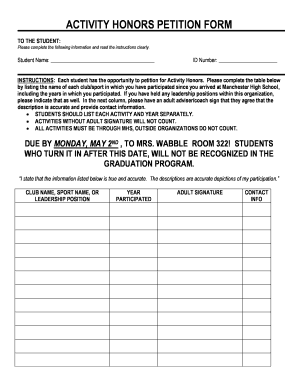
- Begin by entering your full name in the designated 'Student Name' field. Make sure to spell your name correctly, as it will be used in official records.
- Next, input your student ID number in the 'ID Number' field. This identifies you in the school system and is crucial for processing your petition.
- Complete the table by listing each club or sport you have participated in during your time at Manchester High School. Be sure to provide each activity and the corresponding year of participation in separate rows.
- For each activity listed, indicate any leadership positions you held. This serves to highlight your contributions and involvement in these organizations.
- Obtain an adult adviser's or coach’s signature on the form to confirm the accuracy of your entries. This signature validates your participation and is mandatory for your submission.
- In the 'Contact Info' field next to the adult signature, provide a way to reach the verifier for any follow-up if necessary. This may include a phone number or email address.
- Review the completed form to ensure all information is accurate and all required fields are filled out appropriately.
- Finally, save your changes, download a copy of the form, and print it if required. Make sure to submit the completed form to Mrs. Wabble in Room 322 by the due date.
Start completing your Petition Form online today and ensure your accomplishments are recognized!
Petitions start with a letter stating one's points and end with many signatures. Step 1 – Decide on your audience. (Teacher, principal, community leader, senator, Organization, etc) In your greeting, use their name to start your letter. Step 2 – In the body of your letter, explain your issue.