Loading
Get Graphic-design-invoice-templatedoc
How it works
-

Open form follow the instructions
-

Easily sign the form with your finger
-

Send filled & signed form or save
How to use or fill out the Graphic-design-invoice-templatedoc online
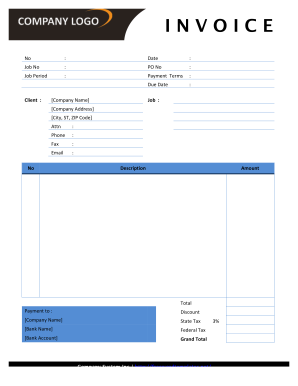
Filling out the Graphic-design-invoice-templatedoc online is an essential step for graphic designers to ensure they receive timely payments for their services. This guide will walk you through each section of the form to help you complete it accurately and efficiently.
Follow the steps to fill out the graphic design invoice template online
- Click the ‘Get Form’ button to obtain the form and open it in your online editor.
- Enter the date of the invoice in the designated field, ensuring it reflects the accurate billing date.
- Fill in the job number, which is a unique identifier for your project. This helps track the work tied to your invoice.
- Input the purchase order (PO) number if applicable; this indicates to your client that the charge is pre-approved.
- Specify the job period, detailing the timeframe during which the services were provided. This can be a specific date range.
- Outline your payment terms in the corresponding field. For example, note whether you expect payment upon receipt or within a specified time frame.
- Set the due date for payment, allowing clients to understand when the invoice must be settled.
- Complete the client information section, including their company name, address, city, state, and ZIP code.
- Address the invoice to a specific individual if needed by entering their name where indicated.
- Add the client's phone number, fax, and email to maintain open communication.
- In the itemized list, describe the services or items provided alongside their corresponding amounts. Be clear and concise for transparency.
- Include any applicable discounts in the discount field to inform the client of the reduced total.
- Calculate state and federal taxes, ensuring the correct percentage is applied based on the location of the service.
- Determine the grand total by summing all charges, discounts, and taxes, presenting a final amount that is due.
- After filling out all sections, review your entries for accuracy before saving changes. You can also download, print, or share the completed document.
Complete your graphic design invoices efficiently by filling them out online today.
This automation allows user to customize their product sign-up page experience with Invoiced. When a customer completes a Google Forms sign-up, a new customer will be automatically created or fetched and then a new invoice will be created in Invoiced.