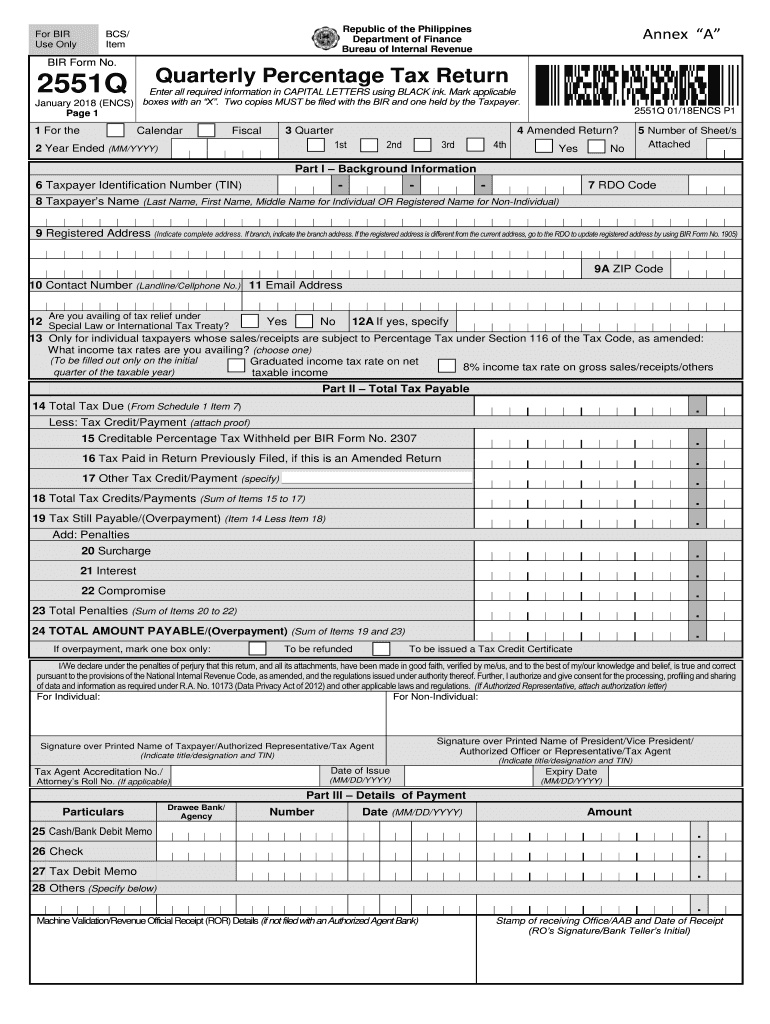
Formation in CAPITAL LETTERS using BLACK ink. Mark applicable January 2018 (ENCS) boxes with an “X”. Two copies MUST be filed with the BIR and one held by the Taxpayer. Page 1 1 For the Calendar 3 Quarter Fiscal 4 Amended Return? 1st 2 Year Ended (MM/YYYY) 2551Q 01/18ENCS P1 2nd 3rd 4th Yes No 5 Number of Sheet/s Attached Part I – Background Information - 6 Taxpayer Identification Number (TIN) - - 7 RDO Code 8 Taxpayer’s Name (Last Name, First Name, Middle Name for In.
Loading

Open form follow the instructions

Easily sign the form with your finger

Send filled & signed form or save
How to fill out the PH BIR 2551Q online
The PH BIR 2551Q is a quarterly percentage tax return form required by the Bureau of Internal Revenue in the Philippines. This guide will provide you with clear, step-by-step instructions on how to accurately fill out this form online.
Follow the steps to complete your BIR 2551Q online
- Click the ‘Get Form’ button to download the form and open it for editing.
- Enter your Taxpayer Identification Number (TIN) in the designated field. Ensure that you include all digits without spaces.
- Fill in the RDO code, which indicates the specific Revenue District Office for your location.
- Input your name as either an individual or the registered name if you are a non-individual. Include your last name, first name, and middle name where applicable.
- Provide your complete registered address. If applicable, specify the branch address. If your registered address differs from your current address, make sure to update it with the BIR using BIR Form No. 1905.
- Complete the contact number field with your landline or cellphone number, and provide a valid email address.
- Indicate if you are availing of tax relief under a special law or international tax treaty by marking the appropriate box. If 'Yes,' specify the relevant details.
- For individual taxpayers, select your income tax rate according to the options available—either the graduated rate or the 8% income tax rate.
- Proceed to Part II and calculate your total tax due based on your sales or receipts by filling out the amounts accurately.
- Enter any tax credits or payments to be deducted from your total tax due, including proof of claims if applicable.
- Calculate the total penalties, if any, and summarize these amounts in the designated sections.
- Finalize your form by checking your calculations. If you have an overpayment, select between a refund or tax credit certificate.
- Sign the form, entering either your name or the authorized representative's name along with the respective titles and TINs.
- Once you have completed all sections, save your changes and download or print the completed form for submission to the BIR.
Complete your BIR 2551Q online to ensure timely and accurate filing.
Experience a faster way to fill out and sign forms on the web. Access the most extensive library of templates available.
Related content
... PH,#QD0#PX. M#QX6%Q(9)" F)2,@(R(H+3DP*"HV*R(C,D0R-CL]0$! )C!&2T4^2CD_0#W_ MP...
... BIR Form 2550M - Monthly Value-Added Tax Declaration BIR Form No. 2550Q - Quarterly...
Get answers to your most pressing questions about US Legal Forms API.
How to apply for 8%?
To apply for the 8% income tax rate, you must first meet eligibility criteria set by the BIR. Then, you need to indicate this option upon registration or when you file your quarterly tax. Keeping informed about the application process ensures you can take advantage of simplified tax obligations, such as the PH BIR 2551Q.
How to register as non-VAT Philippines?
To register as a non-VAT entity in the Philippines, visit your nearest BIR office and submit the required documents, including proof of income. Fill out the necessary forms provided by the BIR staff. Once registered, you will receive a Certificate of Registration, allowing you to file forms like the PH BIR 2551Q without the VAT obligations.
What is the difference between 2551Q and 1701Q PDF?
The PH BIR 2551Q is specifically for taxpayers who are required to file quarterly income tax returns under the percentage tax scheme. In contrast, the 1701Q is designed for individuals who earn income through self-employment and must file their quarterly income tax under the graduated rates. Understanding these distinctions is crucial for accurate tax reporting.
How to apply for non-VAT business in the Philippines?
To apply for a non-VAT business in the Philippines, first, gather necessary documents like your business registration and identification. Next, complete the application form provided by the Bureau of Internal Revenue (BIR). After submitting your application, you'll receive a Certificate of Registration. This process helps ensure compliance with the PH BIR 2551Q requirements.
How to download BIR forms?
To download BIR forms such as the PH BIR 2551Q, visit the official BIR website. Navigate to the forms section, where you can select the specific form you need. Simply click the download link, and the form will be saved to your device. This ensures you have the most up-to-date documents for your tax requirements.
How to submit 2551Q online?
To submit the 2551Q online, access the BIR’s e-filing system. Fill in the required information accurately, including your gross receipts and tax due. Submitting the PH BIR 2551Q online simplifies the filing process and ensures timely compliance.
Who is a non-VAT taxpayer in the Philippines?
VAT taxpayer in the Philippines is typically a business whose gross sales fall below the VAT threshold. These businesses are subject to the percentage tax instead. Understanding your classification helps you correctly prepare and file the PH BIR 2551Q.
How to file a quarterly VAT return?
To file a quarterly VAT return, first complete the necessary forms, including the VAT return form. Submit the form along with payment to your designated BIR office. If you're a non-VAT taxpayer, ensure you file the PH BIR 2551Q instead to avoid penalties.
What is 2551Q quarterly percentage tax return?
The 2551Q quarterly percentage tax return is a form that non-VAT registered businesses file to report their percentage tax liabilities to the BIR. This return is essential for those earning less than the VAT threshold. Filing the PH BIR 2551Q allows businesses to stay compliant with tax regulations.
How to compute for 3% percentage tax?
To compute for the 3% percentage tax, start by determining your gross sales or receipts for the quarter. Then, multiply this amount by 3%. This simple calculation helps you comply with the requirements of the PH BIR 2551Q, ensuring accurate tax payments.
Use professional pre-built templates to fill in and sign documents online faster. Get access to thousands of forms.
If you believe that this page should be taken down, please follow our DMCA take down process here.