Loading
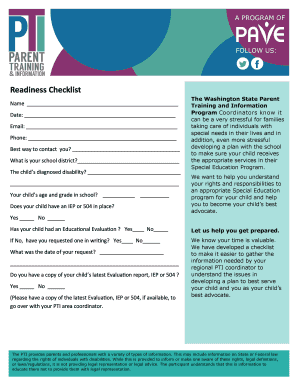
Get Readiness Checklist - Pave - Wapave
How it works
-

Open form follow the instructions
-

Easily sign the form with your finger
-

Send filled & signed form or save
How to fill out the Readiness Checklist - PAVE - Wapave online
Filling out the Readiness Checklist - PAVE - Wapave is an essential step for parents and guardians preparing to advocate for their child's special education needs. This guide provides clear instructions on how to complete the form effectively and comprehensively online.
Follow the steps to complete the Readiness Checklist effectively.
- Press the ‘Get Form’ button to access the Readiness Checklist - PAVE - Wapave and open it in your preferred editor.
- Begin by entering your name in the designated field at the top of the form.
- Fill in the date of completion in the appropriate section.
- Provide your email address in the given space for future correspondence.
- Enter your phone number to facilitate contact.
- Indicate your preferred method of contact by selecting an option in the corresponding field.
- Specify your school district in the designated area.
- Document your child’s diagnosed disability in the relevant section.
- Provide your child’s age and current grade in school in the spaces provided.
- Answer whether your child has an Individualized Education Program (IEP) or 504 Plan in place by marking ‘Yes’ or ‘No.'
- If applicable, indicate whether your child has had an educational evaluation by selecting ‘Yes’ or ‘No.'
- If your child has not had an evaluation, indicate if you have requested one in writing.
- State the date of your request for an evaluation.
- Attach or confirm if you have a copy of your child’s latest evaluation report, IEP, or 504 Plan.
- List up to three main issues or areas you would like your PTI Regional Coordinator to help with.
- Describe the steps you have already taken to resolve these issues.
- Indicate who you have worked with to address these issues.
- If applicable, begin detailing any behavioral issues, suspensions, or expulsions by creating a timeline of events.
- Once you have completed all fields, review the information for accuracy.
- Save your changes, download, print, or share the completed form as necessary.
Get started on completing your Readiness Checklist - PAVE - Wapave online today!
Prediction-Association-Verification-Evaluation (PAVE) Procedure – This procedure encourages students to 1) predict a word's meaning within the context it appears, 2) consult a dictionary to find the correct meaning, and 3) re-evaluate their predictions.