Loading
Form preview
  • US Legal Forms
  • Form Library
  • Foreign Forms
  • Foreign Philippines Other Forms
  • Ph Sss Con-01181 2014

Get Ph Sss Con-01181 2014-2026

day of the month th 7 or 8 25 day of the month 9 or 0 Last day of the month In case the payment deadline falls on a Saturday, Sunday or holiday, payment may be made on the next working day. 3. Submit immediately a copy of validated "Contributions Payment Form" or "Contributions Payment Form" with Special Bank Receipt (SBR) together with the corresponding "Contributions Collection List" or "Contributions Collection List" in electronic media device to the nearest SSS branch. For Individual Payor .

How it works

  1. Open form

    Open form follow the instructions

  2. Easily sign form

    Easily sign the form with your finger

  3. Share form

    Send filled & signed form or save

How to fill out the PH SSS CON-01181 online

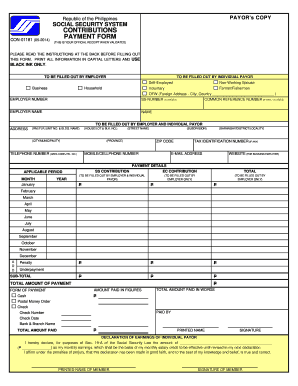
The PH SSS CON-01181 is a crucial document for submitting contributions to the Social Security System in the Philippines. This guide provides step-by-step instructions to assist you in accurately filling out the form online.

Follow the steps to complete your contributions payment form.

  1. Click 'Get Form' button to acquire the form and open it in your designated editor.
  2. Identify your user type and fill in the respective sections for either Employer or Individual Payor. For Employers, include the employer number, employer name, and business address. Individual Payors need to provide their SS number, name, and common reference number, if applicable.
  3. Complete the address section by filling in details including your house or lot number, city, province, and postal code. Make sure to include your mobile number and email address for any necessary correspondence.
  4. Declare your applicable period for contributions and fill out the respective SS and EC contribution amounts based on your salary and classification.
  5. In the Payment Details section, select the month and year for which you are making the payment, and indicate the total amounts in figures and words.
  6. Select your form of payment, whether cash, check, or postal money order, and provide relevant details such as check number and bank information, if applicable.
  7. Complete the Declaration of Earnings section for individual payors, indicating your monthly earnings as per the requirements, and sign the form.
  8. Review all entered information for accuracy. Save your changes, and then download or print the completed form for your records.

Complete your PH SSS CON-01181 form online today to ensure your contributions are submitted promptly.

Get form

Experience a faster way to fill out and sign forms on the web. Access the most extensive library of templates available.
Get form

Related content

p-Toluenesulfonic acid | C7H7SO3H | CID 6101
-4-sulfonic acid is an arenesulfonic acid that is benzenesulfonic acid in which the...
Learn more
Low‐Temperature Synthesis of Stable CaZn2P2...
by S Quadir · 2024 · Cited by 9 — In this article, we report a synthesis route for...
Learn more
AC SERVO DRIVES
as basic mechatronics drive for the most servo drives achieves stable control operation...
Learn more

Related links form

GSA OF 294 2018 GSA SF 35 2016 VA 0857A 2013 Canada Veterinary Certificate Of Health - Nova Scotia 2019

Questions & Answers

Get answers to your most pressing questions about US Legal Forms API.

Contact support

Applying for a SSS voluntary contribution online is user-friendly. After logging into your My.SSS account, look for the option for voluntary contributions. Fill out the form with your relevant details where you can specify your contribution under PH SSS CON-01181. Once you have submitted your application, keep an eye on your account to confirm that your application has been processed successfully.

Filing your SSS benefits online is a straightforward process. Begin by logging into your My.SSS account, then go to the benefits section. Choose the type of benefit you wish to file for and follow the instructions provided. Remember, PH SSS CON-01181 facilitates this process, ensuring your claims are processed efficiently, so you can receive your benefits timely.

The maximum monthly SSS contribution for voluntary members is determined by the highest salary credit available. As of now, this amount allows you to maximize your benefits under PH SSS CON-01181. It is important to consider your financial capacity when deciding your contribution, as higher contributions can lead to better benefits when you file claims. Review the latest SSS updates for any changes in these limits.

To obtain your SSS PRN number for voluntary contributions, simply log into your SSS account on their website. Once you are in, navigate to the PRN section dedicated to voluntary payments. Utilizing the PH SSS CON-01181 can help you retrieve this information with ease.

If you generate a PRN in SSS, it serves as your reference number for the payment of your voluntary contributions. This number is essential for proper tracking and ensuring your contributions are credited accurately. Accessing the PH SSS CON-01181 offers clear instructions on how to use your PRN effectively.

The amount for SSS voluntary contributions varies based on your chosen contribution tier. Generally, you can select a contribution ranging from PHP 1,000 to PHP 2,240 per month. By using the PH SSS CON-01181, you can better understand the different options available for your specific needs.

To get your PRN number for voluntary contributions in SSS online, access your SSS account through their website. After logging in, look for the PRN issuance section and select the option for voluntary contributions. This feature connects directly to PH SSS CON-01181, ensuring a smooth experience in obtaining your PRN.

You can easily obtain a copy of your SSS contribution online by logging into your SSS account on their website. Once logged in, go to the My Contributions section, where you can download and print your contribution records. Using the PH SSS CON-01181 can streamline this process, making access more convenient.

To apply for a voluntary contribution in SSS online, first visit the official SSS website. Log in to your account, and navigate to the contributions section. There, you will find the options for voluntary contributions, and follow the prompts to complete your application. Consider using the PH SSS CON-01181 feature for additional guidance.

Yes, after making 120 contributions, you may be eligible to stop paying SSS if you meet the requirements for retirement. However, staying updated on your contributions relating to PH SSS CON-01181 is crucial, as it affects your benefits and pension. It’s wise to consult the SSS or a qualified professional to understand your options thoroughly.

Get This Form Now!

Use professional pre-built templates to fill in and sign documents online faster. Get access to thousands of forms.
Get form
If you believe that this page should be taken down, please follow our DMCA take down processhere.

Industry-leading security and compliance

US Legal Forms protects your data by complying with industry-specific security standards.
  • In businnes since 1997
    25+ years providing professional legal documents.
  • Accredited business
    Guarantees that a business meets BBB accreditation standards in the US and Canada.
  • Secured by Braintree
    Validated Level 1 PCI DSS compliant payment gateway that accepts most major credit and debit card brands from across the globe.
Get PH SSS CON-01181
Get form
  • Adoption
  • Bankruptcy
  • Contractors
  • Divorce
  • Home Sales
  • Employment
  • Identity Theft
  • Incorporation
  • Landlord Tenant
  • Living Trust
  • Name Change
  • Personal Planning
  • Small Business
  • Wills & Estates
  • Packages A-Z
  • Affidavits
  • Bankruptcy
  • Bill of Sale
  • Corporate - LLC
  • Divorce
  • Employment
  • Identity Theft
  • Internet Technology
  • Landlord Tenant
  • Living Wills
  • Name Change
  • Power of Attorney
  • Real Estate
  • Small Estates
  • Wills
  • All Forms
  • Forms A-Z
  • Form Library
  • Legal Hub
  • About Us
  • Help Portal
  • Legal Resources
  • Blog
  • Affiliates
  • Contact Us
  • Delete My Account
  • Site Map
  • Industries
  • Forms in Spanish
  • Localized Forms
  • State-specific Forms
  • Forms Kit
  • Real Estate Handbook
  • All Guides
  • Notarize
  • Incorporation services
  • For Consumers
  • For Small Business
  • For Attorneys
  • USLegal
  • FormsPass
  • pdfFiller
  • signNow
  • altaFlow
  • DocHub
  • Instapage
Form Packages
  • Adoption
  • Bankruptcy
  • Contractors
  • Divorce
  • Home Sales
  • Employment
  • Identity Theft
  • Incorporation
  • Landlord Tenant
  • Living Trust
  • Name Change
  • Personal Planning
  • Small Business
  • Wills & Estates
  • Packages A-Z
Form Categories
  • Affidavits
  • Bankruptcy
  • Bill of Sale
  • Corporate - LLC
  • Divorce
  • Employment
  • Identity Theft
  • Internet Technology
  • Landlord Tenant
  • Living Wills
  • Name Change
  • Power of Attorney
  • Real Estate
  • Small Estates
  • Wills
  • All Forms
  • Forms A-Z
  • Form Library
Customer Service
  • Legal Hub
  • About Us
  • Help Portal
  • Legal Resources
  • Blog
  • Affiliates
  • Contact Us
  • Delete My Account
  • Site Map
  • Industries
  • Forms in Spanish
  • Localized Forms
  • State-specific Forms
  • Forms Kit
Legal Guides
  • Real Estate Handbook
  • All Guides
Prepared for you
  • Notarize
  • Incorporation services
Our Customers
  • For Consumers
  • For Small Business
  • For Attorneys
Our Sites
  • USLegal
  • FormsPass
  • pdfFiller
  • signNow
  • altaFlow
  • DocHub
  • Instapage
Social Media
Call us now toll free:
+1 833 426 79 33
As seen in:
© Copyright 1999-2026 airSlate Legal Forms, Inc. 3720 Flowood Dr, Flowood, Mississippi 39232
  • Your Privacy Choices
  • Terms of Service
  • Privacy Notice
  • Content Takedown Policy
  • Bug Bounty Program