Loading
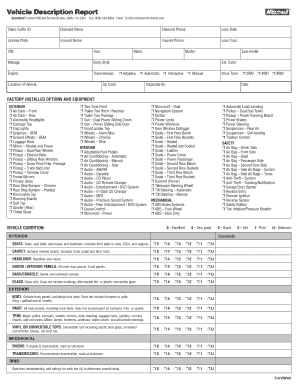
Get Vehicle Description Report
How it works
-

Open form follow the instructions
-

Easily sign the form with your finger
-

Send filled & signed form or save
How to fill out the Vehicle Description Report online
Filling out the Vehicle Description Report online is a straightforward process that helps in accurately documenting vehicle details for claims and assessments. This guide provides step-by-step instructions to ensure that you complete the report correctly and efficiently.
Follow the steps to complete your Vehicle Description Report online.
- Click the ‘Get Form’ button to access the Vehicle Description Report and open it in your editor.
- Begin by entering the Claim-Suffix ID in the designated field. This identifier is crucial for tracking your report.
- Fill out the Claimant Name and Claimant Phone fields to ensure you provide your contact information.
- Specify the Loss Date, which is the date the incident occurred.
- Enter the License Plate number of the vehicle being described.
- Provide the Insured Name and Insured Phone for any claims related to the vehicle.
- Indicate the Loss Type to describe the nature of the claim.
- Fill in the Vehicle Identification Number (VIN) for accurate identification.
- Complete vehicle details including Year, Mileage, Body Style, Engine, and Transmission type.
- Specify the Location of Vehicle and details such as Make and Model, as well as Sub-model if applicable.
- Indicate the Exterior Color and any adaptive features the vehicle may have.
- Select the Drive Train type from options like 2WD, 4WD, or AWD.
- Enter the name of the person who inspected the vehicle and the date of inspection.
- Detail factory-installed options and equipment by checking the appropriate boxes for both exterior and interior features.
- Assess the vehicle's condition by selecting a rating from 1 (poor) to 5 (excellent) across different categories including interior, exterior, and mechanical.
- Provide comments if necessary, especially for sections regarding after-market installed parts or prior damages.
- Review all entered information for accuracy before finalizing the report.
- Once you have filled out the form in its entirety, save your changes, and choose to download, print, or share the completed Vehicle Description Report as needed.
Take the next step and complete your Vehicle Description Report online today.
Get a Carfax Report: Second, once you've identified some cars you're interested in, it's a good idea to obtain a Carfax Vehicle History Report on them before you agree to buy. You can get a free Vehicle History Report with every vehicle in Carfax's Used Car Listings.