Loading
Get Broward County Schools District Literary Fair 20152016 Student Entry Form Must Be Submitted With
How it works
-

Open form follow the instructions
-

Easily sign the form with your finger
-

Send filled & signed form or save
How to fill out the Broward County Schools District Literary Fair 2015-2016 Student Entry Form online
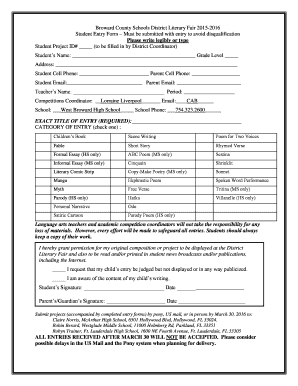
This guide provides detailed instructions on completing the Broward County Schools District Literary Fair 2015-2016 Student Entry Form. By following these steps, users can ensure their form is filled out correctly to avoid disqualification.
Follow the steps to successfully complete your entry form.
- Click ‘Get Form’ button to obtain the entry form and open it in your preferred document viewer.
- Begin by filling in the Student Project ID# section, which should be completed by the District Coordinator. Leave this blank for now.
- In the 'Student’s Name' field, write the full name of the student participating in the literary fair.
- Provide the 'Grade Level' of the student by entering the appropriate grade number.
- Fill out the 'Address' section with the student's home address to ensure proper identification.
- Enter the student's cell phone number in the designated area, followed by the parent's cell phone number.
- Complete the 'Student Email' and 'Parent Email' fields with valid email addresses for communication purposes.
- For 'Teacher’s Name', provide the name of the student's language arts teacher, including the class period.
- Specify the name of the 'Competitions Coordinator', which in this instance is Lorraine Liverpool, along with their email if applicable.
- Indicate the 'School' name and the 'School Phone' number.
- In the 'EXACT TITLE OF ENTRY (REQUIRED)' section, write the complete title of the student’s project.
- Select one category of entry by checking the appropriate box from the list provided.
- Read and check the statements regarding the permission for the project’s display and the acknowledgment of content.
- Obtain all necessary signatures, including those of the student and parent/guardian, along with the corresponding dates.
- Once completed, save the changes, and if necessary, download, print, or share the form as required.
Ensure your form is completed accurately and submitted online before the final deadline.
Industry-leading security and compliance
US Legal Forms protects your data by complying with industry-specific security standards.
-
In businnes since 199725+ years providing professional legal documents.
-
Accredited businessGuarantees that a business meets BBB accreditation standards in the US and Canada.
-
Secured by BraintreeValidated Level 1 PCI DSS compliant payment gateway that accepts most major credit and debit card brands from across the globe.