Loading
Form preview
  • US Legal Forms
  • Form Library
  • More Forms
  • More Uncategorized Forms
  • Form 8594

Get Form 8594

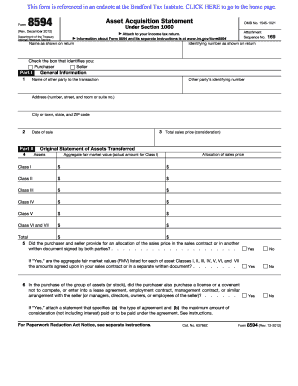
This form is referenced in an endnote at the Bradford Tax Institute. CLICK HERE to go to the home page. Form 8594 Asset Acquisition Statement OMB No. 15451021 Under Section 1060 (Rev. December 2012).

How it works

  1. Open form

    Open form follow the instructions

  2. Easily sign form

    Easily sign the form with your finger

  3. Share form

    Send filled & signed form or save

How to fill out the Form 8594 online

Filling out Form 8594, the Asset Acquisition Statement, is essential for reporting certain asset transfers for tax purposes. This guide will walk you through each section of the form to ensure you complete it accurately and efficiently.

Follow the steps to successfully complete Form 8594 online.

  1. Click ‘Get Form’ button to obtain the form and open it in the online editor.
  2. Begin by entering your name as it appears on your tax return and your identifying number. Select whether you are the purchaser or the seller by checking the appropriate box.
  3. In Part I, provide general information about the transaction. Include the name and identifying number of the other party, their address (including city, state, and ZIP code), the total sales price, and the date of the sale.
  4. In Part II, detail the original statement of assets transferred. Allocate the sales price across the different asset classes (I to VII) and ensure you enter both the total sales price for each class and the aggregate fair market value.
  5. Indicate whether the purchaser and seller have provided an allocation of the sales price in the sales contract or another written document. If 'Yes', confirm if the aggregate fair market values listed correspond with the amounts in the agreement.
  6. Answer whether the purchaser acquired a license, covenant not to compete, or any additional agreements related to the assets. If 'Yes', attach a statement that details the type of agreement and the maximum consideration involved.
  7. If you are amending a previously filed statement, complete Part III by providing the tax year and tax return form number previously filed. Report the previously allocated sales price and the new allocation for each asset class, indicating increases or decreases.
  8. Provide a summary of reasons for any increase or decrease in the allocation, attaching additional sheets if necessary.
  9. After filling out all relevant sections and reviewing for accuracy, save your changes. You may download, print, or share the completed form as required.

Complete Form 8594 online today and ensure your asset transfers are reported accurately for tax purposes.

Get form

Experience a faster way to fill out and sign forms on the web. Access the most extensive library of templates available.
Get form

Related content

About Form 8594, Asset Acquisition Statement Under...
Sep 19, 2020 — Information about Form 8594, Asset Acquisition Statement Under Section...
Learn more
download PDF - Farmdoc
report the nature of such an arrangement on Form 8594. If the seller of the assets is a...
Learn more
Form 8594 (Rev. December 2012) F8594...
Asset Acquisition Statement 8594 OMB No. 1545-1021 Under Section 1060 Form (Rev. December...
Learn more

Related links form

Download A Donation Form (pdf, 29.3 KB) - Berklee College Of Music - Berklee Medical Release Form - Bluffton University - Bluffton Boston School Of Psychoanalysis Sushi Order Form

Questions & Answers

Get answers to your most pressing questions about US Legal Forms API.

Contact support

Instructions for Form 8594 The form must be filed when a group of assets were transferred (in a trade or business), and if the buyer's basis in such assets is determined by the amount paid for the assets. This applies when the group of assets make up a trade, or business in the hands of the seller, the buyer, or both.

Form 8594 is used to report the sale and purchase of a group of assets that constitute a business. Both the purchaser and seller must file Form 8594 with their own individual income tax return. On Form 8594, the total selling price of the business is allocated to asset classes using the residual method.

How to Perform Purchase Price Allocation (Step-by-Step) Step 1 → Assign the Fair Value of Identifiable Tangible and Intangible Assets Purchased. Step 2 → Allocate the Remaining Difference Between the Purchase Price and the Collective Fair Values of the Acquired Assets and Liabilities into Goodwill.

The purpose of the PPA is to help you identify all the assets that were acquired, tangible and intangible, and the liabilities that were assumed, and recognize them at fair value.

Subsequently, the financial reporting standards (RJ and IFRS) require that the purchase price paid (in a business combination) needs to be allocated to the assets acquired and liabilities assumed, a process that is also referred to as a 'purchase price allocation' or PPA.

IRS Form 8594 requires that both parties allocate the purchase price among the various assets of the business being purchased so the seller can calculate the taxes due upon the sale, and the buyer can calculate the new basis in the assets.

Who is Responsible for Purchase Price Allocation? The Internal Revenue Code requires that both buyers and sellers submit a purchase price allocation on form 8594. A common misconception is that buyers and sellers must submit consistent purchase price allocations.

Purpose of Form Both the seller and purchaser of a group of assets that makes up a trade or business must use Form 8594 to report such a sale if goodwill or going concern value attaches, or could attach, to such assets and if the purchaser's basis in the assets is determined only by the amount paid for the assets.

Get This Form Now!

Use professional pre-built templates to fill in and sign documents online faster. Get access to thousands of forms.
Get form
If you believe that this page should be taken down, please follow our DMCA take down processhere.
Get Form 8594
Get form
  • Adoption
  • Bankruptcy
  • Contractors
  • Divorce
  • Home Sales
  • Employment
  • Identity Theft
  • Incorporation
  • Landlord Tenant
  • Living Trust
  • Name Change
  • Personal Planning
  • Small Business
  • Wills & Estates
  • Packages A-Z
  • Affidavits
  • Bankruptcy
  • Bill of Sale
  • Corporate - LLC
  • Divorce
  • Employment
  • Identity Theft
  • Internet Technology
  • Landlord Tenant
  • Living Wills
  • Name Change
  • Power of Attorney
  • Real Estate
  • Small Estates
  • Wills
  • All Forms
  • Forms A-Z
  • Form Library
  • Legal Hub
  • About Us
  • Help Portal
  • Legal Resources
  • Blog
  • Affiliates
  • Contact Us
  • Delete My Account
  • Site Map
  • Industries
  • Forms in Spanish
  • Localized Forms
  • State-specific Forms
  • Forms Kit
  • Real Estate Handbook
  • All Guides
  • Notarize
  • Incorporation services
  • For Consumers
  • For Small Business
  • For Attorneys
  • USLegal
  • FormsPass
  • pdfFiller
  • signNow
  • altaFlow
  • DocHub
  • Instapage
Form Packages
  • Adoption
  • Bankruptcy
  • Contractors
  • Divorce
  • Home Sales
  • Employment
  • Identity Theft
  • Incorporation
  • Landlord Tenant
  • Living Trust
  • Name Change
  • Personal Planning
  • Small Business
  • Wills & Estates
  • Packages A-Z
Form Categories
  • Affidavits
  • Bankruptcy
  • Bill of Sale
  • Corporate - LLC
  • Divorce
  • Employment
  • Identity Theft
  • Internet Technology
  • Landlord Tenant
  • Living Wills
  • Name Change
  • Power of Attorney
  • Real Estate
  • Small Estates
  • Wills
  • All Forms
  • Forms A-Z
  • Form Library
Customer Service
  • Legal Hub
  • About Us
  • Help Portal
  • Legal Resources
  • Blog
  • Affiliates
  • Contact Us
  • Delete My Account
  • Site Map
  • Industries
  • Forms in Spanish
  • Localized Forms
  • State-specific Forms
  • Forms Kit
Legal Guides
  • Real Estate Handbook
  • All Guides
Prepared for you
  • Notarize
  • Incorporation services
Our Customers
  • For Consumers
  • For Small Business
  • For Attorneys
Our Sites
  • USLegal
  • FormsPass
  • pdfFiller
  • signNow
  • altaFlow
  • DocHub
  • Instapage
Social Media
Call us now toll free:
+1 833 426 79 33
As seen in:
© Copyright 1999-2026 airSlate Legal Forms, Inc. 3720 Flowood Dr, Flowood, Mississippi 39232
  • Your Privacy Choices
  • Terms of Service
  • Privacy Notice
  • Content Takedown Policy
  • Bug Bounty Program