Loading
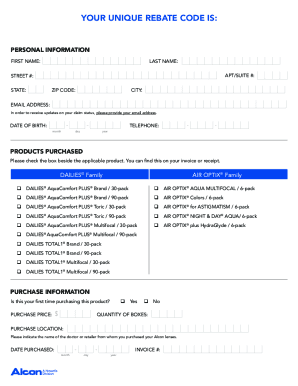
Get Alcon Choice Rebate Form
How it works
-

Open form follow the instructions
-

Easily sign the form with your finger
-

Send filled & signed form or save
How to fill out the Alcon Choice Rebate Form online
This guide provides clear and detailed instructions for completing the Alcon Choice Rebate Form online. By following these steps, you will ensure a smooth submission process and maximize your rebate benefits.
Follow the steps to fill out the Alcon Choice Rebate Form online
- Press the ‘Get Form’ button to download the rebate form and open it in your preferred document editor.
- Locate your unique rebate code, which can be found at the top of the rebate form. Ensure you have this code ready as it will be required during the submission process.
- Gather the necessary documentation for proof of purchase. This includes one original UPC code for each brand of lens purchased, a copy of your eye exam receipt and/or contact lens fitting receipt, and a copy of your original sales receipt with the eligible contact lens products circled.
- Visit the online claim submission area provided by Alcon. You will need to upload the required documentation collected in step 3.
- Enter your unique rebate code in the designated field on the online form.
- Fill in your contact information accurately on the online form. Ensure your email address is included for updates on your claim status.
- Once all information is filled out, review the form for accuracy and completeness before submission.
- Submit the form online and watch for an email confirmation from Alcon with additional instructions regarding your rebate reward.
Complete your Alcon Choice Rebate Form online today to secure your rebate.
To check the status of your Alcon rebate, visit the rebate tracking section on the Alcon website. By entering your details, you can access the current status of your submission. You can also call their customer support if you encounter any issues or need further assistance regarding the Alcon Choice Rebate Form.