Loading
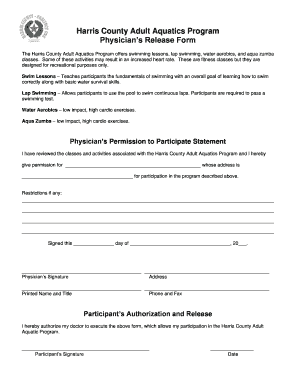
Get Harris County Adult Aquatics Program Physicians Release Form - Hcp1
How it works
-

Open form follow the instructions
-

Easily sign the form with your finger
-

Send filled & signed form or save
How to fill out the Harris County Adult Aquatics Program Physicians Release Form - Hcp1 online
Filling out the Harris County Adult Aquatics Program Physicians Release Form - Hcp1 online is a simple process that ensures your participation in various aquatic activities. This guide will navigate you through each section of the form to ensure it's completed accurately and efficiently.
Follow the steps to successfully complete the form
- Click ‘Get Form’ button to obtain the form and open it in the editor.
- In the first section, 'Physician’s Permission to Participate Statement,' fill in the name of the participant and their address in the designated fields. This information is crucial as it identifies who is seeking permission.
- If there are any restrictions regarding the participant's ability to engage in the activities, please indicate them clearly in the space provided under 'Restrictions if any.'
- Next, the physician must sign and date the form. The signature section requires the physician’s signature, printed name, title, and contact information, including address, phone, and fax numbers.
- In the 'Participant’s Authorization and Release' section, the participant must provide their signature and the date, authorizing their doctor to execute the form, thereby allowing their participation in the program.
- Once all information has been entered and verified for accuracy, you can save the form changes, and choose to download, print, or share the completed document as needed.
Complete the Harris County Adult Aquatics Program Physicians Release Form - Hcp1 online to ensure your participation today.
Create a document Open Word. Or, if Word is already open, select File > New. In the Search for online templates box, enter a search word like letter, resume, or invoice. Or, select a category under the search box like Business, Personal, or Education. Click a template to see a preview. ... Select Create.