Loading
Get L2402 - North American
How it works
-

Open form follow the instructions
-

Easily sign the form with your finger
-

Send filled & signed form or save
How to fill out the L2402 - North American online
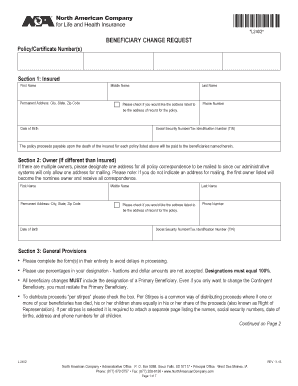
The L2402 - North American form is designed for users to request a change of beneficiaries for an insurance policy. This guide will provide you with clear, step-by-step instructions on how to complete the form online effectively and accurately.
Follow the steps to successfully fill out the L2402 form online.
- Click the ‘Get Form’ button to obtain the form and open it in the editor.
- In Section 1, enter the insured person's first name, middle name, last name, date of birth, permanent address, phone number, and social security number or tax identification number. If you want this address to be the record address for the policy, check the corresponding box.
- Move to Section 2 if the owner differs from the insured. Fill in the owner's details including their first name, middle name, last name, date of birth, permanent address, phone number, and social security number or tax identification number, and indicate if the address should serve as the policy's record address.
- In Section 3, review the general provisions carefully. Complete the form entirely to prevent delays in processing, and designate percentages for beneficiaries that total 100%. Ensure that a primary beneficiary is included, even if changes are only made to contingent beneficiaries.
- For Section 4A, begin listing primary beneficiaries. For each beneficiary, provide their name, percentage of proceeds, date of birth, street address, relationship, phone number, state, and social security number or tax identification number. Ensure to check the box if you are using additional sheets.
- Proceed to Section 4B to list contingent beneficiaries using the same format as for the primary beneficiaries. This section is also required to process your request.
- In Section 5, all owners must sign the form. If applicable, include the spouse's signature and a disinterested witness signature for owners in Massachusetts.
- If you are identifying a trust as a beneficiary, complete Section 6 with details regarding the trust and its trustees.
- Once all sections are completed, review the entire form for accuracy. Save any changes, and download or print the completed form when ready.
- Finally, submit the form according to the provided instructions, ensuring that any necessary attachments are included.
Ensure a smooth process by completing your documents online today.
If you have questions on your available options, please call us toll-free at 877-880-6367. We are available Monday through Thursday from 7:30 am to 5:00 pm (CST) and Friday from 7:30 am to 12:30 pm (CST).