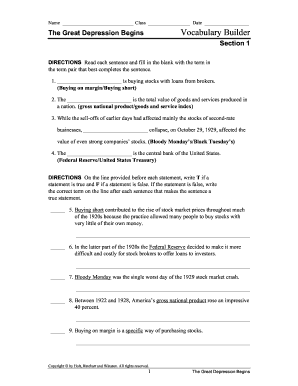
Name Class Date The Great Depression Begins Vocabulary Builder Section 1 DIRECTIONS Read each sentence and fill in the blank with the term in the term pair that best completes the sentence. 1. is.
Open form follow the instructions
Easily sign the form with your finger
Send filled & signed form or save
How to fill out The Great Depression Begins Vocabulary Builder online
Filling out The Great Depression Begins Vocabulary Builder online can enhance your understanding of key historical terms. This guide provides a step-by-step approach to help you complete the form efficiently and accurately.
Follow the steps to complete the vocabulary builder effectively.
- Click the ‘Get Form’ button to access the vocabulary builder. This action will allow you to open the form in your preferred editor.
- Begin with Section 1, where you will read each sentence and fill in the blank with the appropriate term from the provided pair. Take your time to ensure that you understand each sentence closely.
- Continue to the next part of Section 1, where you'll evaluate the truth of statements by marking 'T' for true and 'F' for false. For any false statements, write the correct term that makes the statement true.
- Move on to Section 2, where you will write three adjectives or descriptive phrases that pertain to each term provided. This exercise will help deepen your comprehension of the vocabulary.
- In the subsequent part of Section 2, repeat the true/false evaluations with new statements, ensuring to indicate any corrections for false statements.
- Proceed to Section 3, where you will need to identify the term that does not relate to the others from each given set. Mark your answers clearly.
- Answer the questions in Section 3 by crafting sentences that incorporate at least one word from the word bank. This will assist in reinforcing your knowledge through practical application.
- Once you have completed all sections, make sure to review your answers. Save any changes you made, and consider downloading or printing the completed form for personal reference.
Complete The Great Depression Begins Vocabulary Builder online to enhance your understanding of this important historical period.
Experience a faster way to fill out and sign forms on the web. Access the most extensive library of templates available.
Related content
Unit 15: The Great Depression (1929-1932). 169. Unit Focus. 169 ... several ways:...
If you ally obsession such a referred great depression begins answers ebook that ... Great...
Joseph Conrad was a Polish-British writer regarded as one of the greatest novelists to...
Get answers to your most pressing questions about US Legal Forms API.
Can you convert a PDF into an editable File?
To convert a PDF into an editable document, simply upload it to Google Drive. Once in Google Drive, right-click the file, and choose to open with Google Docs. This process is not a perfect conversion, and the formatting will likely need editing, however, it does convert the PDF.
Which app is best for PDF making?
Adobe Acrobat (Windows, macOS, iOS, and Android) Adobe Acrobat is the high-water mark of PDF editor apps—and for good reason. It offers a comprehensive set of features, so you can review and edit PDFs, create and complete forms, and collaborate on files.
Is there a free PDF editor?
EaseUS is a free PDF editor that offers options to read, create, edit and convert PDFs both in program and online. The streamlined interface allows you to edit or convert with ease for any formats like doc, excel, ppt, jpg, png or epub, even merge, split, compress, watermark e-sign or OCR PDF files.
How do I save as PDF?
How to save a PDF of a web page Open the print menu by pressing Ctrl+P. Under the “Printer” drop-down menu, select “Microsoft Print to PDF” or “Save as PDF”. ... Click “Print”. When prompted, choose where you want to save the file.
Can you make a PDF editable online?
How to edit PDF files online. Choose a PDF to edit by clicking the Select a file button above, or drag and drop a file into the drop zone. Once Acrobat uploads the file, sign in to add your comments. Use the toolbar to add text, sticky notes, highlights, drawings, and more.
How do I convert a PDF to an editable PDF online?
How to Make a PDF Editable? To make a PDF editable, upload your document using 's uploader. online editor instantly converts any PDF document to an editable format online. ... Choose the 'Text' button and start typing. ... Click the 'Signature' or 'Picture' buttons to sign your document or insert an image.
How do I turn a normal PDF into an editable PDF?
How to make a PDF editable with Acrobat. Open your PDF file in Acrobat Pro. Click the Edit PDF tool on the right-hand panel. ... Use editing tools to add new text, edit text, or update fonts using selections from the Format drop-down list. Move, add, replace, or resize images using the tools in the Objects list.
How do I convert a scanned PDF to an editable PDF online?
Instructions and Help about convert scanned pdf to editable pdf Access the PDF OCR Scanner & Converter feature by logging into your account and navigating to the 'My Forms' page. Click on the 'Upload' button to select the scanned PDF document you want to convert.
Use professional pre-built templates to fill in and sign documents online faster. Get access to thousands of forms.
If you believe that this page should be taken down, please follow our DMCA take down process here.