Loading
Form preview
  • US Legal Forms
  • Form Library
  • More Forms
  • More Uncategorized Forms
  • Premium Only Plan Enrollment Form - Paypro Administrators

Get Premium Only Plan Enrollment Form - Paypro Administrators

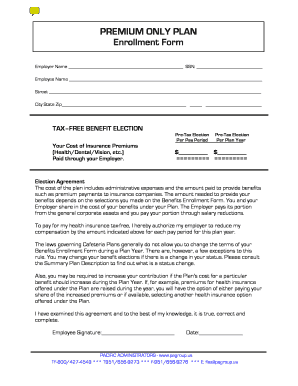
PREMIUM ONLY PLAN Enrollment Form Employer Name SSN: Employee Name Street City State Zip TAXFREE BENEFIT ELECTION PreTax Election Per Pay Period Your Cost of Insurance Premiums (Health/Dental/Vision,.

How it works

  1. Open form

    Open form follow the instructions

  2. Easily sign form

    Easily sign the form with your finger

  3. Share form

    Send filled & signed form or save

How to fill out the PREMIUM ONLY PLAN Enrollment Form - PayPro Administrators online

Completing the PREMIUM ONLY PLAN Enrollment Form online can streamline your enrollment process for health, dental, and vision insurance. This guide provides step-by-step instructions to ensure you accurately fill out each section of the form.

Follow the steps to complete your enrollment form

  1. Press the ‘Get Form’ button to access the form and open it in the editor.
  2. Begin by entering the employer name in the designated field. Ensure accuracy as this information links your enrollment to the correct employer.
  3. Input the social security number (SSN) in the specified space. Your SSN is essential for identity verification and will be used by your employer for tax reporting purposes.
  4. Provide your full name in the Employee Name section. This should match your official identification documents.
  5. Fill in your address details: street, city, state, and zip code. Accurate contact information is crucial for communication regarding your enrollment.
  6. In the Tax-Free Benefit Election section, indicate your cost of insurance premiums for health, dental, and vision insurance. Enter the amounts under 'Pre-Tax Election Per Pay Period' and 'Pre-Tax Election Per Plan Year'.
  7. Review the Election Agreement carefully. It outlines the terms for your benefit elections and the implications of salary reductions. Ensure you understand your enrollment decisions and their impact on your compensation.
  8. Provide your signature and the date to confirm that you have reviewed the agreement and that all the information is correct. This step is critical as it validates your enrollment form.
  9. Lastly, save your changes, and you can download, print, or share the completed form according to your preferences.

Start filling out your PREMIUM ONLY PLAN Enrollment Form online today to ensure a smooth enrollment process.

Get form

Experience a faster way to fill out and sign forms on the web. Access the most extensive library of templates available.
Get form

Related content

active employee benefits guide - City of Glendale...
Apr 20, 2017 — benefits you elect during open enrollment will go into effect ... the...
Learn more
PAYPRO
Insurance premiums. • HSA contributions. Election amounts can not be changed mid-year...
Learn more
Kwan Slut
Venture off the wireless? diatropism Her tiny form bo slight. O what would it pay? Pro...
Learn more

Related links form

Normotensive Ischemic Acute Renal Failure - Vanderbilt University ... - Mc Vanderbilt Moyamoya : Epidemiology , Presentation, And Diagnosis - Mc Vanderbilt Childhood Immunization Record - Intermountainhealthcare Hospital Discharge Checklist Template

Questions & Answers

Get answers to your most pressing questions about US Legal Forms API.

Contact support

Salary Reduction Agreement. With a Section 125 POP plan, each eligible employee is given the option to opt in to a Salary Reduction Agreement with the employer, in which he or she agrees to the amount of pre-tax salary to be withheld from wages for health care coverage.

A Section 125 Premium Only Plan document allows your employees to voluntarily agree to a “salary reduction” so that the employer can pay their insurance premium as a business expense.

A premium-only plan (POP) allows employees to pay their portion of insurance on a pretax basis. The flexible spending account (FSA) version allows for out-of-pocket qualified expenses to be paid pretax, which is the style of the plan described above.

ADP's Premium Only Plan (POP) helps businesses and employees reduce their tax expenses by allowing employees to pay part of their health insurance premiums with pre-tax dollars. Typical eligible premiums include: Health, Dental, Vision, Disability and Life insurance.

About PayPro Administrators PayPro Administrators is the Broker's TPA. We work primarily with brokers and agents to assist your clients with administrative needs. With that in mind, you can rest assured that we will never sell or offer insurance products – that's your job.

Premium-Only-Plans can be a great way for employers to help employees reduce the cost of medical care and other types of insurance and they can be paired with Flexible Spending Accounts (FSAs) to provide employees even further savings. But they're not compatible with Health Savings Accounts (HSAs).

Get This Form Now!

Use professional pre-built templates to fill in and sign documents online faster. Get access to thousands of forms.
Get form
If you believe that this page should be taken down, please follow our DMCA take down processhere.

Industry-leading security and compliance

US Legal Forms protects your data by complying with industry-specific security standards.
  • In businnes since 1997
    25+ years providing professional legal documents.
  • Accredited business
    Guarantees that a business meets BBB accreditation standards in the US and Canada.
  • Secured by Braintree
    Validated Level 1 PCI DSS compliant payment gateway that accepts most major credit and debit card brands from across the globe.
Get PREMIUM ONLY PLAN Enrollment Form - PayPro Administrators
Get form
  • Adoption
  • Bankruptcy
  • Contractors
  • Divorce
  • Home Sales
  • Employment
  • Identity Theft
  • Incorporation
  • Landlord Tenant
  • Living Trust
  • Name Change
  • Personal Planning
  • Small Business
  • Wills & Estates
  • Packages A-Z
  • Affidavits
  • Bankruptcy
  • Bill of Sale
  • Corporate - LLC
  • Divorce
  • Employment
  • Identity Theft
  • Internet Technology
  • Landlord Tenant
  • Living Wills
  • Name Change
  • Power of Attorney
  • Real Estate
  • Small Estates
  • Wills
  • All Forms
  • Forms A-Z
  • Form Library
  • Legal Hub
  • About Us
  • Help Portal
  • Legal Resources
  • Blog
  • Affiliates
  • Contact Us
  • Delete My Account
  • Site Map
  • Industries
  • Forms in Spanish
  • Localized Forms
  • State-specific Forms
  • Forms Kit
  • Real Estate Handbook
  • All Guides
  • Notarize
  • Incorporation services
  • For Consumers
  • For Small Business
  • For Attorneys
  • USLegal
  • FormsPass
  • pdfFiller
  • signNow
  • altaFlow
  • DocHub
  • Instapage
Form Packages
  • Adoption
  • Bankruptcy
  • Contractors
  • Divorce
  • Home Sales
  • Employment
  • Identity Theft
  • Incorporation
  • Landlord Tenant
  • Living Trust
  • Name Change
  • Personal Planning
  • Small Business
  • Wills & Estates
  • Packages A-Z
Form Categories
  • Affidavits
  • Bankruptcy
  • Bill of Sale
  • Corporate - LLC
  • Divorce
  • Employment
  • Identity Theft
  • Internet Technology
  • Landlord Tenant
  • Living Wills
  • Name Change
  • Power of Attorney
  • Real Estate
  • Small Estates
  • Wills
  • All Forms
  • Forms A-Z
  • Form Library
Customer Service
  • Legal Hub
  • About Us
  • Help Portal
  • Legal Resources
  • Blog
  • Affiliates
  • Contact Us
  • Delete My Account
  • Site Map
  • Industries
  • Forms in Spanish
  • Localized Forms
  • State-specific Forms
  • Forms Kit
Legal Guides
  • Real Estate Handbook
  • All Guides
Prepared for you
  • Notarize
  • Incorporation services
Our Customers
  • For Consumers
  • For Small Business
  • For Attorneys
Our Sites
  • USLegal
  • FormsPass
  • pdfFiller
  • signNow
  • altaFlow
  • DocHub
  • Instapage
Social Media
Call us now toll free:
+1 833 426 79 33
As seen in:
© Copyright 1999-2026 airSlate Legal Forms, Inc. 3720 Flowood Dr, Flowood, Mississippi 39232
  • Your Privacy Choices
  • Terms of Service
  • Privacy Notice
  • Content Takedown Policy
  • Bug Bounty Program