Loading
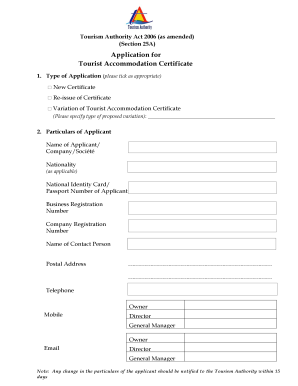
Get Accommodation Certificate
How it works
-

Open form follow the instructions
-

Easily sign the form with your finger
-

Send filled & signed form or save
How to fill out the Accommodation Certificate online
This guide provides step-by-step instructions on how to complete the Accommodation Certificate online. It aims to support users in accurately entering the required information to apply for or modify their tourist accommodation certification.
Follow the steps to complete your Accommodation Certificate.
- Press the ‘Get Form’ button to access the Accommodation Certificate form and open it in your preferred online editor.
- Select the type of application you are submitting by ticking the appropriate box: 'New Certificate', 'Re-issue of Certificate', or 'Variation of Tourist Accommodation Certificate'. If you are requesting a variation, please specify the type of proposed variation in the provided field.
- Enter your particulars in the Applicant section. Provide the Name of Applicant/Company, Nationality (if applicable), National Identity Card/Passport Number, Business Registration Number, Company Registration Number, Name of Contact Person, Postal Address, Telephone number, Mobile number, Director/General Manager's information, and Email.
- If applicable, fill out the particulars of the representative section with their Name, Designation, and National Identity Card/Passport Number.
- In the Particulars of Business section, enter the Business Name/Trade Name, Address of Tourist Accommodation, Telephone, Mobile, and Fax numbers, and Email.
- List the shareholders and directors in the section provided. Include information such as their names, nationalities, number of shares, percentage of shareholding, and NIC/Passport Number. If necessary, attach additional sheets.
- Indicate the type of tourist accommodation by ticking the appropriate option: Hotel, Guest House, Tourist Residence, or Domaine.
- Complete the details of facilities offered by your accommodation. Depending on the type of accommodation, fill out relevant sections regarding room numbers, restaurants, health and fitness facilities, and any other additional services. Attach extra sheets if required.
- Answer the questions regarding any convictions, refusals of licenses, or revocations of a Tourist Enterprise License within the past three years. Provide details if applicable.
- Read and acknowledge the declaration that the information provided is true and accurate. Enter your name, signature, designation, and date.
- Ensure that the application is accompanied by a payment of the required fee and any required documents such as copies of valid Tourist Enterprise Licences. Review all attached documents before finalizing.
- Finally, save your changes, download the completed form, and prepare to print or share it as needed.
Start filling out your Accommodation Certificate online today to ensure your application is processed smoothly.
An Accommodation Certificate proves that your home is suitable for your family members to live in. Some people call it a Validation Certificate or immigration form.
Industry-leading security and compliance
US Legal Forms protects your data by complying with industry-specific security standards.
-
In businnes since 199725+ years providing professional legal documents.
-
Accredited businessGuarantees that a business meets BBB accreditation standards in the US and Canada.
-
Secured by BraintreeValidated Level 1 PCI DSS compliant payment gateway that accepts most major credit and debit card brands from across the globe.