Loading
Get Maternity Grant Gibraltar
How it works
-

Open form follow the instructions
-

Easily sign the form with your finger
-

Send filled & signed form or save
How to fill out the Maternity Grant Gibraltar online
This guide provides clear and comprehensive instructions for filling out the Maternity Grant Gibraltar online. Whether you are submitting your claim before or after your confinement, this step-by-step approach will assist you in completing the process accurately and efficiently.
Follow the steps to complete your Maternity Grant application.
- Click ‘Get Form’ button to obtain the form and open it in the editor.
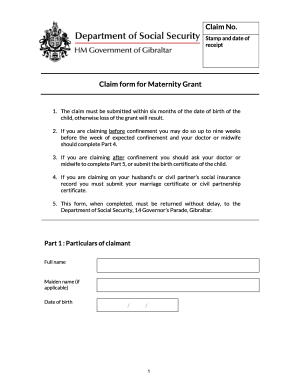
- Begin by filling out Part 1: Particulars of claimant. Include your full name, maiden name (if applicable), date of birth, address, email address, daytime phone number, nationality, tax reference number, and ID card number. If you are claiming on your partner's social insurance record, indicate this and provide your employer’s name and address.
- Proceed to Part 2: Particulars of husband or civil partner if applicable. Fill in their full name, date of birth, tax reference number, ID card number, date of marriage or civil partnership, and their employer’s name and address.
- Move on to Part 3: Work history outside Gibraltar. Indicate whether you or your partner have worked outside Gibraltar and provide details for any countries worked in, including the dates and whether social security contributions were made.
- If claiming before confinement, complete Part 4: Certificate of expected confinement. This section needs to be signed by a registered medical practitioner or a certified midwife. Provide the necessary information regarding your examination, expected confinement date, and ensure the medical professional's signature and stamp are included.
- If claiming after confinement, complete Part 5: Certificate of confinement, which also requires a signature from a registered medical practitioner or certified midwife. Fill in your name and the date of your child’s birth.
- In Part 6: Bank details, enter the account information for where you wish to receive the grant payment. Provide the institution’s name, your account details, and if applicable, the third-party account information.
- Utilize Part 7: Other information to include any additional relevant details that may assist with your claim. Remember to attach any extra sheets with your name, address, and ID number.
- Finally, complete Part 8: Declaration. Review all statements you have made on the form for accuracy, and sign and date the declaration.
- Once all sections are completed, save your changes, and you may choose to download, print, or share the form as needed. Make sure to return the completed form to the Department of Social Security promptly.
Complete your application for the Maternity Grant online today.
State retirement age in Gibraltar is currently 60 for women and 65 for men, despite the life expectancy for women being 83 and for men being 79.
Industry-leading security and compliance
US Legal Forms protects your data by complying with industry-specific security standards.
-
In businnes since 199725+ years providing professional legal documents.
-
Accredited businessGuarantees that a business meets BBB accreditation standards in the US and Canada.
-
Secured by BraintreeValidated Level 1 PCI DSS compliant payment gateway that accepts most major credit and debit card brands from across the globe.