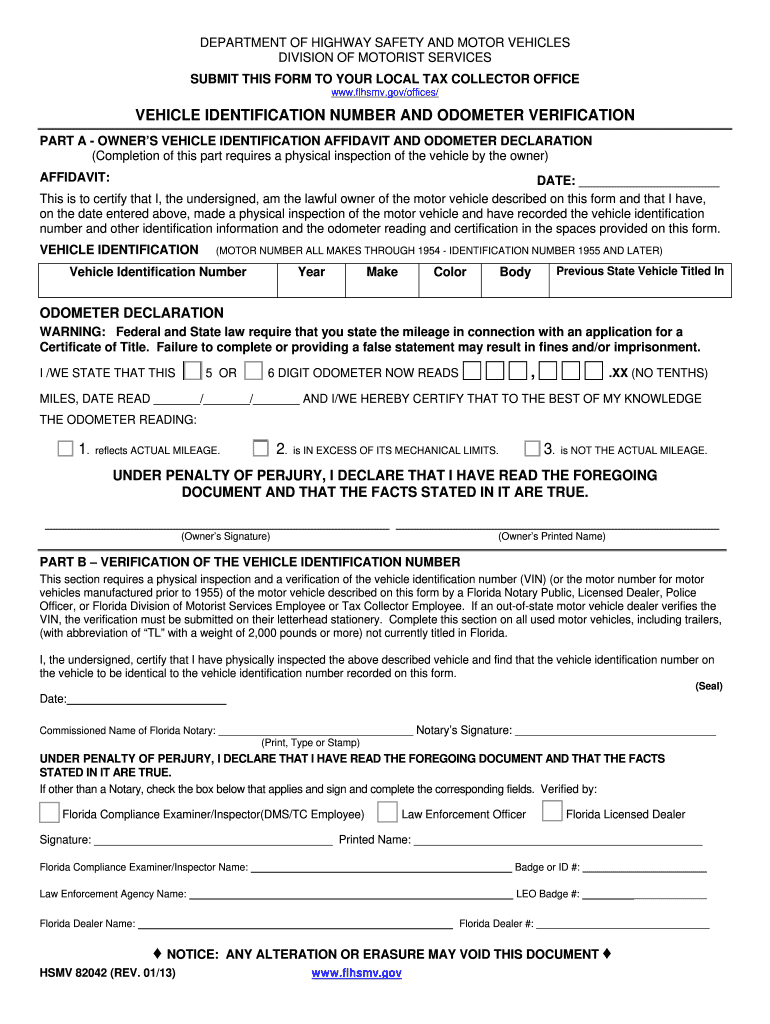
Verified by Florida Compliance Examiner/Inspector DMS/TC Employee Law Enforcement Officer Florida Licensed Dealer Signature Printed Name Badge or ID LEO Badge Florida Dealer Name NOTICE HSMV 82042 REV. 01/13 ANY ALTERATION OR ERASURE MAY VOID THIS DOCUMENT WHO IS AUTHORIZED TO COMPLETE THIS FORM ANY PERSON OR AUTHORIZED AGENT OF ANY PERSON REQUIRED TO MAKE APPLICATION FOR CERTIFICATE OF TITLE AND/OR REGISTRATION. WHEN SHOULD THIS FORM BE COMPLETED ON ALL USED MOTOR VEHICLES INCLUDING TRAILERS NOT CURRENTLY TITLED IN FLORIDA WITH A NET WEIGHT OF 2 000 POUNDS OR MORE. WHEN CERTIFICATE OF TITLE IS BEING APPLIED FOR ON ONE OF THE FOLLOWING 1. Complete this section on all used motor vehicles including trailers with abbreviation of TL with a weight of 2 000 pounds or more not currently titled in Florida. I the undersigned certify that I have physically inspected the above described vehicle and find that the vehicle identification number on the vehicle to be identical to the vehicle identific....
Loading

Open form follow the instructions

Easily sign the form with your finger

Send filled & signed form or save
How to fill out the FL HSMV 82042 online
Filling out the FL HSMV 82042 form is essential for vehicle identification and odometer verification. This guide provides a clear, step-by-step process to help users complete the form online accurately and efficiently.
Follow the steps to complete the FL HSMV 82042 form online.
- Press the ‘Get Form’ button to access the FL HSMV 82042 form and open it in your preferred online editor.
- Begin with Part A, where you will provide your vehicle's information. Fill in the date, your name as the owner, and ensure you perform a physical inspection of the vehicle to gather its VIN, year, make, color, body type, and the previous state it was titled in.
- Next, in the Odometer Declaration section, state the mileage as per the current odometer reading, following the format provided. Make sure to clarify if the mileage reflects actual reading or any exceptions.
- In Part B, verify the vehicle identification number by obtaining a certification from an authorized individual such as a Florida notary public, law enforcement officer, or a licensed dealer. Ensure they fill in their name, signature, and relevant information.
- Once all fields are completed, review the entire form for accuracy. Make any necessary corrections.
- After finalizing your changes, you can save the form, download it for your records, print it for submission, or share it as needed.
Complete your FL HSMV 82042 form online today to streamline your vehicle registration process.
Experience a faster way to fill out and sign forms on the web. Access the most extensive library of templates available.
Related content
WHEN SHOULD THIS FORM BE COMPLETED? ON ALL USED MOTOR VEHICLES, INCLUDING TRAILERS NOT...
Get answers to your most pressing questions about US Legal Forms API.
Do both parties need to be present to transfer a title in FL?
In Florida, both parties do not need to be present to transfer a title, but it can simplify the process. The seller must sign the title and provide the necessary documentation, while the buyer must ensure they have all required forms, including the FL HSMV 82042 resources. Familiarizing yourself with the process makes transferring titles much easier.
How to fill out a vehicle title application?
To successfully fill out a vehicle title application in Florida, access the appropriate form, which is available through the FL HSMV 82042 platform. Provide essential information such as vehicle identification number, make, model, and your personal details. After completing the application, double-check for any missing information to prevent processing delays.
How to fill out a Florida certificate of title?
To fill out a Florida certificate of title, start by entering the basic vehicle information and the current owner's details. Use the FL HSMV 82042 guidelines to ensure you include all required sections, such as odometer readings and lienholder information. After you fill it out, be sure to sign and date the document before submission.
How to fill out Florida form HSMV 82040?
Filling out Florida form HSMV 82040 involves providing accurate details about your vehicle, including the current owner’s information and the vehicle specifics. You can easily download this form through the FL HSMV 82042 page. Once filled, make sure to review all entries to avoid any delays in processing.
How to get a VIN verification in Florida?
To get a VIN verification in Florida, you need to complete a VIN verification form, which you can find through the FL HSMV 82042 resources. You can obtain the verification from an authorized agency or a law enforcement officer. Once completed, ensure that your form is ready for submission along with any title or registration applications.
How do I file Form HSMV 82050?
To file Form HSMV 82050, first, ensure you have completed the form accurately. Gather any supporting documents required, such as proof of identity and ownership. You can submit the completed form to your local Florida DMV office or send it by mail, depending on the instructions provided. Using the US Legal Forms platform can help ensure that you have the latest version of the form and guidance on the filing process associated with FL HSMV 82042.
How is VIN verification done in Florida?
In Florida, VIN verification is typically conducted by a law enforcement officer, an authorized Florida DMV representative, or a licensed vehicle dealer. To complete the verification, the individual performing the check will inspect the vehicle and compare the VIN on the title documents with the VIN on the vehicle itself. It is important to retain any documentation of this process as you may need it when filing forms like FL HSMV 82042. Consider using US Legal Forms for more information on document requirements and VIN verification procedures.
How to fill out Florida DMV power of attorney?
To fill out the Florida DMV power of attorney, you first need to obtain the correct form from the Florida Department of Highway Safety and Motor Vehicles (HSMV). Carefully enter the necessary details such as the name of the person granting power, the name of the agent, and the specific powers being granted. Be sure to review the instructions on the FL HSMV 82042 form to ensure all required signatures and dates are included. Using the US Legal Forms platform can simplify this process by providing clear instructions and access to the necessary documents.
How to check a Florida VIN number?
You can check a Florida VIN number by accessing reliable online resources, such as the Florida HSMV website or platforms like uslegalforms. These resources provide comprehensive information on how to obtain VIN details and confirm whether the vehicle complies with FL HSMV 82042 standards. Be sure to have the VIN on hand for a smooth search experience.
Who fills out an odometer statement?
The seller of the vehicle typically fills out the odometer statement. This statement is crucial during the transfer of ownership, as it documents the vehicle's mileage. When handling the paperwork, be mindful of the FL HSMV 82042 guidelines to ensure accuracy and compliance.
Use professional pre-built templates to fill in and sign documents online faster. Get access to thousands of forms.
If you believe that this page should be taken down, please follow our DMCA take down process here.